TotalAV Prices 2026: Free vs. Paid Plans
Compare TotalAV's free and paid antivirus plans, including introductory prices, renewal costs, and features, to find the best value.


Last updated Nov 5, 2026
All About Cookies is an independent, advertising-supported website. Some of the offers that appear on this site are from third-party advertisers from which All About Cookies receives compensation. This compensation may impact how and where products appear on this site (including, for example, the order in which they appear).
All About Cookies does not include all financial or credit offers that might be available to consumers nor do we include all companies or all available products. Information is accurate as of the publishing date and has not been provided or endorsed by the advertiser.
The All About Cookies editorial team strives to provide accurate, in-depth information and reviews to help you, our reader, make online privacy decisions with confidence. Here's what you can expect from us:
TotalAV offers a free antivirus scanner and three paid plans, with Antivirus Pro starting at $19.00/first yr. The paid plans add real-time malware protection and, depending on the subscription, extras such as a VPN, ad blocker, and password manager.
TotalAV performed well in our hands-on malware detection tests, although its phishing protection was less consistent. Below, we compare TotalAV's free and paid plans, introductory prices, renewal costs, and features to help you decide which subscription offers the best value.

 Antivirus that earned AV-TEST's Top Product award on Windows in August 2026
Passed every malware and drive-by download test we ran, quarantining threats automatically
Includes a junk cleaner, app uninstaller, and browser cleaner to keep your device running smoothly alongside the antivirus
TotalAV has three paid tiers: Antivirus Pro, Internet Security, and Total Security, with starting prices of $19.00/first yr, $49.00/first yr, and $69.00/first yr, respectively. There's also a limited free antivirus scanner.
These are introductory prices for the first year. After that, Antivirus Pro renews at $99 per year, Internet Security at $129 per year, and Total Security at $149 per year. Keep those increases in mind when comparing TotalAV with other antivirus programs.
Antivirus Pro covers the essentials, including real-time malware protection, phishing protection, and system cleanup tools for up to four devices. Internet Security builds on those features with a VPN and coverage for six devices, while Total Security adds Total Adblock and a password manager for up to eight devices. The best value depends on whether you need antivirus protection alone or want additional privacy and security tools in one subscription.
| Subscription | Free | Antivirus Pro | Internet Security | Total Security |
| First-year price | Free | $19.00/first yr | $49.00/first yr | $69.00/first yr |
| Renewal price | Free | $99.00/yr | $129.00/yr | $149.00/yr |
| Best for | Occasional malware scans | Essential antivirus protection | Antivirus protection with a VPN | Multiple devices and additional security tools |
| # devices supported | 1 | 4 | 6 | 8 |
| Manual malware scans | ||||
| Performance optimization tools | Limited | |||
| Phishing protection | ||||
| Real-time protection | ||||
| Ransomware protection | ||||
| VPN | ||||
| Compatible with | Windows, macOS, Android, iOS | Windows, macOS, Android, iOS | Windows, macOS, Android, iOS | Windows, macOS, Android, iOS |
| Details | View Plan | View Plan | View Plan | View Plan |
TotalAV's free antivirus is a useful starting point if you want to check your computer for malware without committing to a subscription. Its smart scan identifies potential threats and vulnerabilities, and you can quarantine or remove detected malware and unwanted applications.
The main limitation is that the free version doesn't provide continuous protection. You can run scans when you want to check for threats, but real-time protection, which monitors suspicious files and activity in the background, requires a paid plan or trial.
Is it worth upgrading? Antivirus Pro is worth considering if you want TotalAV to detect threats automatically instead of relying on manual scans. You also get phishing protection and system cleanup tools. If you're looking for free antivirus protection that includes real-time monitoring, compare other options in our best free antivirus software guide.
For more details on how TotalAV performed in our testing, read our TotalAV review.
TotalAV combines malware protection with device cleanup tools, plus additional privacy features on higher-tier plans. In our testing, we found its interface intuitive and easy to navigate, with clearly organized tools for malware protection, internet security, and system tune-up.
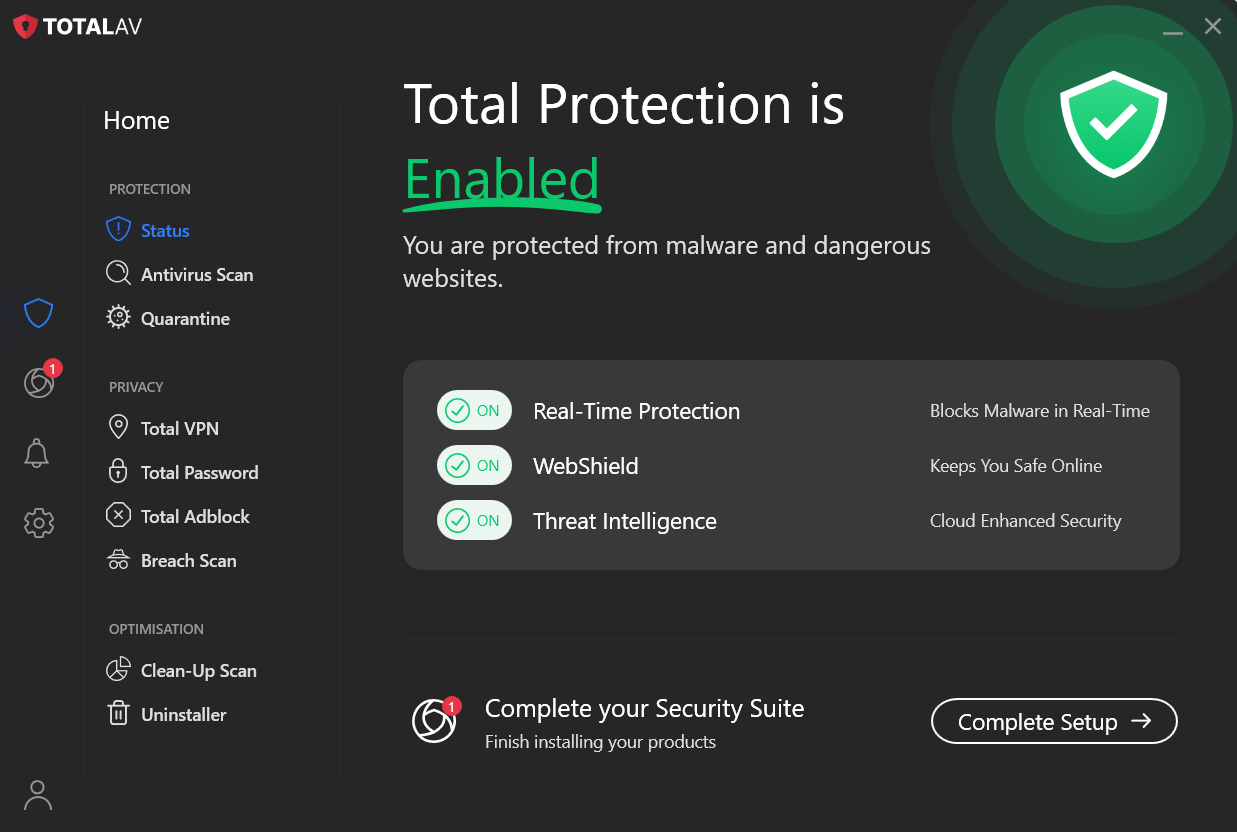
Here's a closer look at TotalAV's features and what they add to your subscription:
TotalAV offers several scans: QuickScan, System, Smart Scans, and Custom Scans. You can configure your scans to run however you prefer. Set them up to run like clockwork, or scan your device manually.
Viruses and malware are ever-evolving, so if your antivirus software doesn't offer real-time protection, you could still be vulnerable. Real-time protection refers to the software's ability to scan files for threats as they're created or accessed, stopping potential cyberthreats before they affect your device. Using TotalAV's real-time protection, you can check downloads and installs each time your device accesses them.
TotalAV's paid plans also help protect against ransomware, which can encrypt your files and demand payment to restore access.
Phishing and ransomware are common cyberthreats, and TotalAV's software helps block phishing and malware attempts.
The WebShield add-on continuously checks the internet for threats, such as malware and phishing scams, and blocks websites it deems unreliable or untrustworthy.
Most day-to-day activities, from shopping to banking, can be done online. Unfortunately, these online activities leave traces of your personal information online. The VPN included with Internet Security and Total Security encrypts your connection to the VPN server and can help protect your browsing on public Wi-Fi. TotalAV supports protocols such as OpenVPN and IKEv2, depending on the platform.
Total Adblock helps reduce ads and pop-ups that can clutter your browsing. It's included with Total Security, making that plan worth considering if you want ad blocking alongside antivirus protection.
Total Security includes a password manager, which lets you generate strong, unique passwords, store them in a secure vault, and use one-click logins. It's a useful addition if you'd rather manage passwords and antivirus protection in one subscription.
TotalAV's Junk Cleaner scans for junk files that are taking up too much space, while the Duplicate File Finder eliminates duplicate files, images, and videos. The browser cleaner tracks your website visits, helping you monitor and manage cookies. TotalAV also includes an uninstaller to remove applications you no longer want or need.
TotalAV performed well in our desktop malware detection testing, although its phishing protection was less consistent. Independent antivirus lab results also provide a useful measure of its effectiveness across different operating systems.
In our desktop testing, TotalAV successfully detected and blocked the malware test files we used. However, it failed our phishing detection test during both our June and October 2026 retests, suggesting that its protection against malicious websites could be more reliable.
We also found TotalAV easy to navigate, with clearly organized security and optimization tools. During our testing, its quick scan completed in about 1 minute and 17 seconds.
TotalAV supports Windows, macOS, Android, and iOS, making it a flexible option for protecting multiple devices under one subscription. Its malware protection has also performed well in independent AV-TEST evaluations, although features vary by operating system.
Here's how TotalAV scored in AV-TEST's most recent evaluations tracked by All About Cookies:
| Operating system | AV-TEST score | Test date |
| Windows | 17.5/18 | August 2026 |
| macOS | 18/18 | June 2026 |
| Android | 18/18 | September 2026 |
AV-TEST evaluates antivirus software on protection, performance, and usability, with a maximum score of 18 points. These independent results provide another measure of TotalAV's effectiveness alongside our own hands-on testing. While TotalAV also offers an iOS app, it doesn't perform traditional antivirus scans on iPhones.
For more details on TotalAV's performance, including our malware detection tests, the latest independent lab results, and available customer support options, see our full TotalAV review.
TotalAV combines affordable introductory pricing with an easy-to-use interface and a range of security tools. Our hands-on testing found its malware protection effective, although phishing protection was inconsistent. Renewal costs are also worth considering, especially if you don't need the extra features included in higher-tier plans.
If you're comparing TotalAV with other antivirus suites, Norton is one of its strongest competitors. Price is a major differentiator: TotalAV has a lower introductory price and offers a free antivirus scanner, while Norton's paid plans start higher but include more comprehensive security features.
Both offer malware protection, a VPN, and password management on eligible plans. However, Norton stands out for its firewall, parental controls, and cloud backup, while TotalAV offers a simpler interface and useful device optimization tools. Norton also performed better in our hands-on antivirus testing, particularly when detecting phishing threats.
TotalAV may be the better fit if you're looking for affordable first-year protection, but compare renewal costs before committing. Norton can be more competitive over the long term, especially if you'll use its additional security tools. See our full TotalAV vs. Norton comparison for a closer look at pricing, features, and test results.

 Antivirus that earned AV-TEST's Top Product award on Windows in August 2026
Passed every malware and drive-by download test we ran, quarantining threats automatically
Includes a junk cleaner, app uninstaller, and browser cleaner to keep your device running smoothly alongside the antivirus
 Top antivirus that scores 18/18 on AV-TEST across Windows, macOS, and Android, verified across multiple test rounds
Passed every malware, drive-by download, and phishing detection test we ran, quarantining threats automatically
Backed by a 100% Virus Protection Promise: if Norton can't remove a virus, you get your money back
TotalAV offers a practical upgrade path, from its free scanner to paid antivirus protection and broader security bundles. Its malware detection performed well in our hands-on testing, although its phishing protection was less reliable.
Antivirus Pro is the best starting point for most users who want real-time malware protection and cleanup tools without paying for extras. Internet Security adds a VPN and coverage for more devices, while Total Security brings together antivirus, a VPN, ad blocking, and password management.
When deciding which plan offers the best value, consider which tools you'll actually use and the renewal price. If TotalAV isn't the right fit for your needs, our guide to the best antivirus software can help you find the right program.
Yes. TotalAV subscriptions automatically renew unless you cancel before the renewal date. Introductory discounts generally apply only to the first billing period, so your renewal price may be higher. You can check your next payment date and amount in your TotalAV account.
TotalAV offers a free antivirus scanner that can identify malware and unwanted applications. However, continuous real-time protection requires a paid subscription or trial. TotalAV's paid plans also offer additional security features, with higher tiers adding tools such as a VPN, ad blocker, and password manager.
Yes. You can cancel automatic renewal through your TotalAV account. Refunds are generally available within 30 days of purchasing or renewing an annual or biannual subscription, or within 14 days for monthly and quarterly plans. Canceling automatic renewal doesn't automatically trigger a refund; you must request one separately. App Store and Google Play purchases follow their respective refund processes.
TotalAV accepts Visa, Mastercard, American Express, Discover, and PayPal.
Antivirus that earned AV-TEST's Top Product award on Windows in August 2026
Passed every malware and drive-by download test we ran, quarantining threats automatically
Includes a junk cleaner, app uninstaller, and browser cleaner to keep your device running smoothly alongside the antivirus