Kids and Tech Study 2026: When Kids Get Their First Devices, What Parents Worry About, and How They Monitor [Data Study]
For the All About Cookies 2026 Kids and Tech Study, we partnered with Bark to survey 2,013 U.S. parents of kids under 18 about when their kids got their first devices, how much time they spend on screens, and how families are keeping up with it all.
We receive compensation from the products and services mentioned in
this story, but the opinions are the
author's own. Compensation may impact where offers appear. We have not included all available products or offers.
Learn more about
how we make money
and
our editorial policies.
Advertiser Disclosure
All About Cookies is an independent, advertising-supported website. Some of the offers that appear on this
site are from third-party advertisers from which All About Cookies receives compensation. This compensation
may impact how and where products appear on this site (including, for example, the order in which they
appear).
All About Cookies does not include all financial or credit offers that might be available to consumers nor
do
we include all companies or all available products. Information is accurate as of the publishing date and
has
not been provided or endorsed by the advertiser.
Close
Editorial Policy
The All About Cookies editorial team strives to provide accurate, in-depth information and reviews to help
you, our reader, make online privacy decisions with confidence. Here's what you can expect from us:
All About Cookies makes money when you click the links on our site to some of the products and offers that
we mention. These partnerships do not influence our opinions or recommendations. Read more about how we
make money.
Partners are not able to review or request changes to our content except for compliance reasons.
We aim to make sure everything on our site is up-to-date and accurate as of the publishing date, but we
cannot guarantee we haven't missed something. It's your responsibility to double-check all information
before making any decision. If you spot something that looks wrong, please let us know.
Close
For most families, a child’s first device doesn’t arrive with a big conversation. It shows up as a hand-me-down tablet, a school-issued laptop, or a phone handed over so a kid can call home after practice. According to our data, the average child gets their own tech device 2.7 years before the age parents say is right, with 45% of parents admitting it arrived earlier than they planned.
Before long, the device is part of daily life, and parents are left figuring out the rules as they go. Along the way, most parents watch closely, worry a lot, and run into the limits of the controls built into the devices they hand over.
To understand how families are handling kids and tech, our research team at All About Cookies partnered with Bark on the 2026 Kids and Tech Study, a survey of 2,013 U.S. parents of children under 18 conducted in October 2026. We asked when their kids got their devices, why, how much time they spend on screens, and what parents are doing to keep them safer.
Here are the top findings from the 2026 Kids and Tech Study.
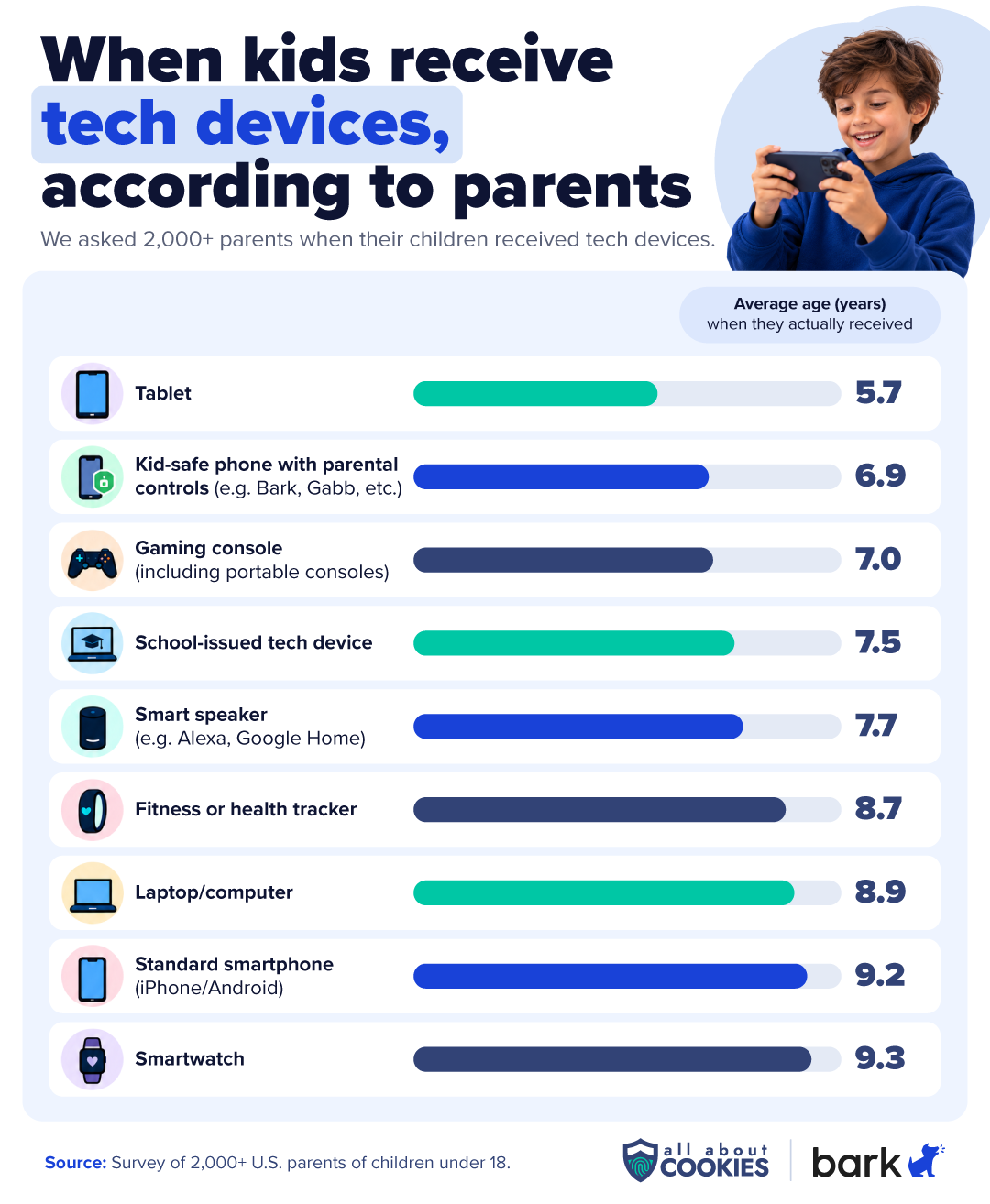
Kids are getting devices years earlier than parents think they should. Among kids who have their own smartphone, the average age they got it was 9.2, while parents say 12.3 is the right age. Tablets arrive at 5.7 years old, versus the ideal age of 8.6.
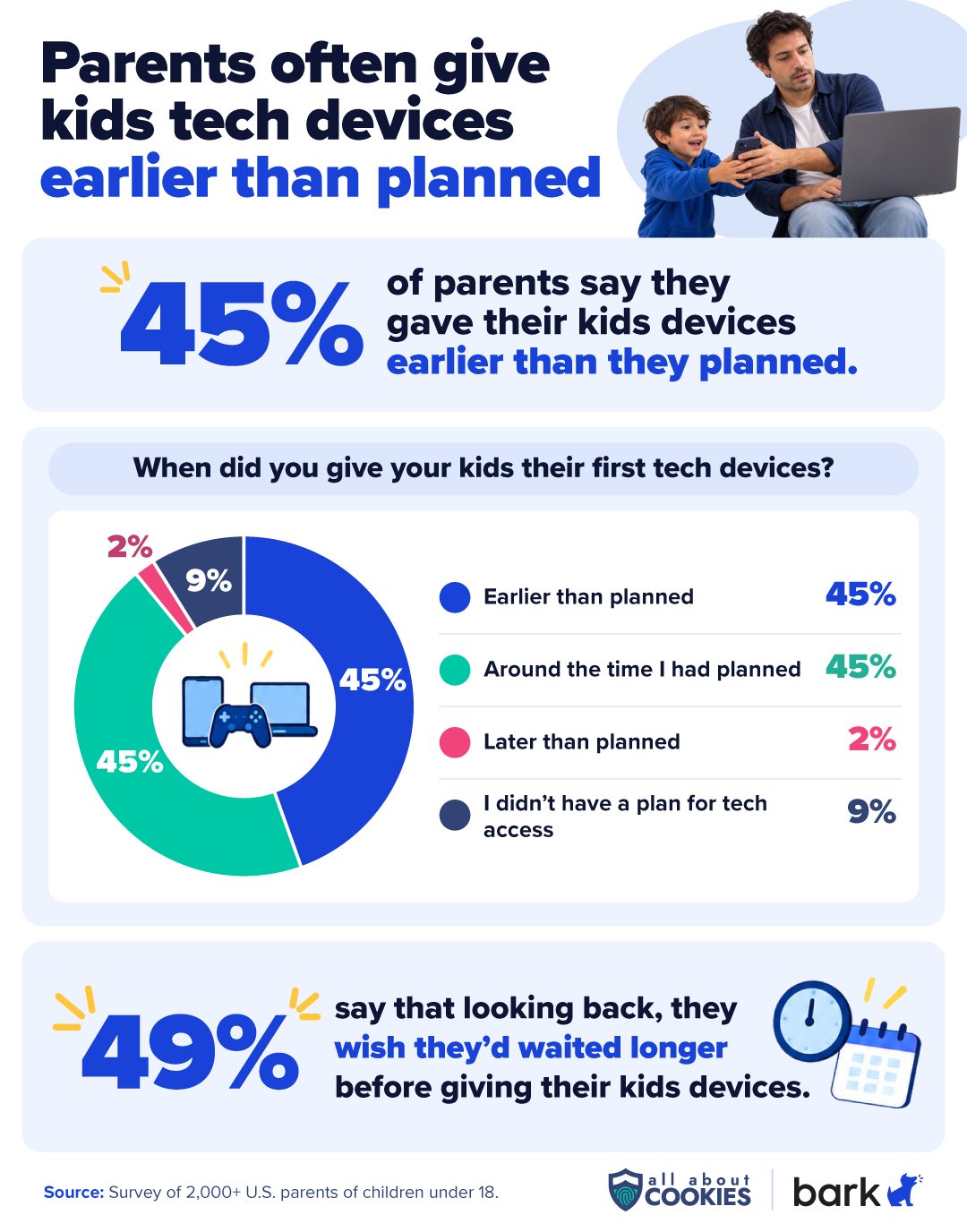
45% of parents whose child has a device say it came earlier than planned, and 49% say that, looking back, they wish they’d waited longer.
74% of parents have worried their child is addicted to their phone, screens, or social media, rising to 83% among parents of 10- to 12-year-olds.
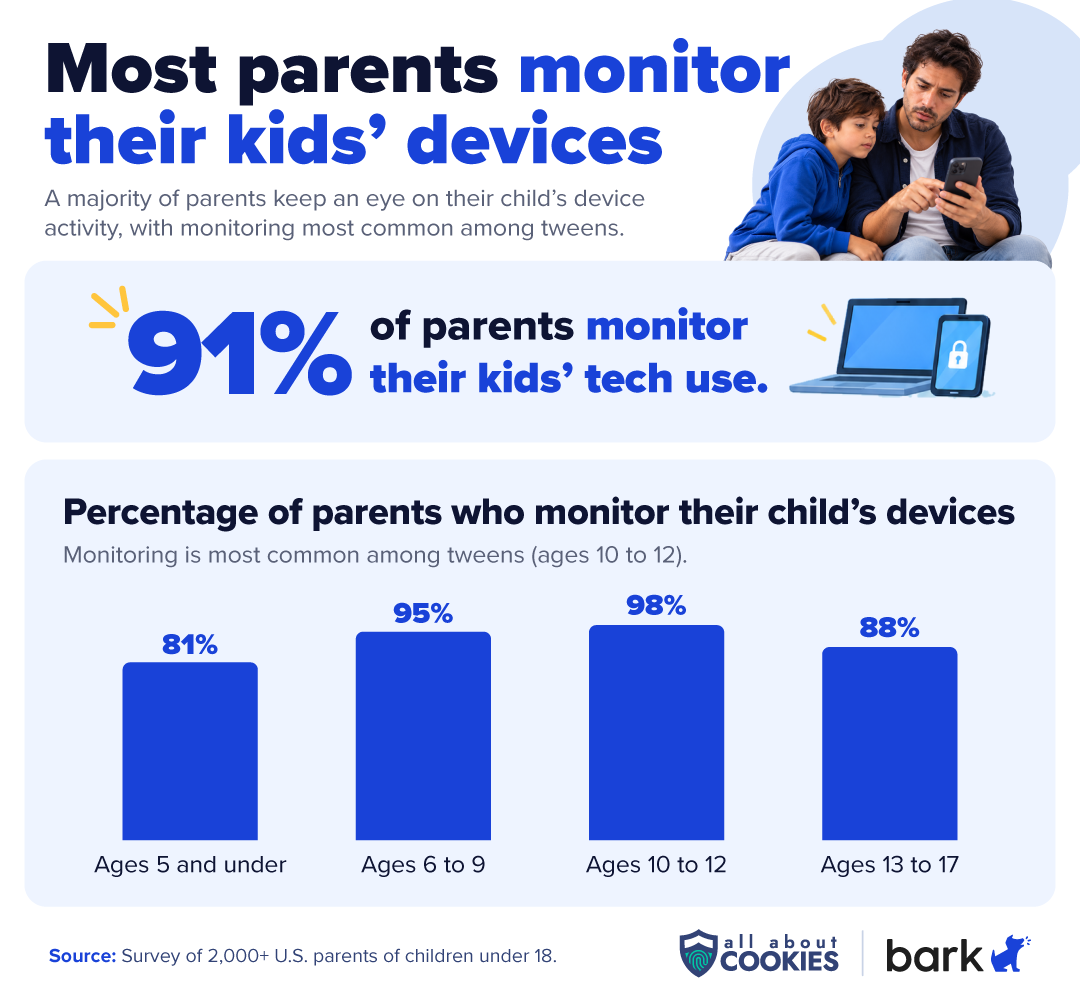
91% of parents monitor their kids’ tech use. Of those, 37% say monitoring helped them discover something concerning, and 88% say it gives them peace of mind.
When do kids get their first devices?
To understand the baseline age of tech adoption for kids, we started by asking parents a simple question: when did you give your kids various devices, and when did you plan to give them?
Tablets are the gateway device for most kids. On average, kids get their own tablet at 5.7 years old, followed by gaming consoles (7.0), laptops (8.9), and smartphones (9.2).
The order makes sense. A tablet keeps a young child busy on a road trip, and school-issued tech devices are an increasingly common way for teachers to assign homework and tests. The full smartphone, with its app store, browser, and social media, comes later as kids mature into using them.
As an alternative to full-access smartphones, kid-safe smartphones with built-in parental controls help bridge the gap between full use and a more protected experience as kids learn to use tech devices responsibly.
The Bark Phone, for example, is a Samsung smartphone with Bark parental controls built in. On its Starter plan, it works for talk and text only, with no internet, app store, or games. Parents can move to an Advanced plan and add apps and browsing as their child gets older, without buying a new phone.
Parents are giving their kids tech earlier than planned
The decision to give tech devices to kids is often driven by a multitude of factors, from need to social pressures. Among parents who have given a child their own device, 45% say it was earlier than planned, while 45% said it came around when they expected. Just 2% held out longer than planned, while 9% said they didn’t have a plan at all.
Looking back, nearly half (49%) of parents say they wish they’d waited longer before giving their kids a personal device.
What age do parents think kids should get their first phone?
According to our survey, parents believe 12.3 years old is the appropriate age for a child's first standard smartphone. However, among children who already have their own smartphones, the average age they received one was 9.2 — a difference of 3.1 years.
The gap extends beyond smartphones. Across the devices we surveyed, parents gave their kids devices 2.7 years earlier than they thought kids should receive them. The table below breaks down the differences by device.
Device
When they actually received
When parents think they should get them
Difference (years)
Tablet
5.7
8.6
2.9
Gaming console (including portable consoles)
7.0
9.4
2.4
School-issued tech device
7.5
9.1
1.6
Smart speaker (e.g. Alexa, Google Home)
7.7
10.6
2.9
Fitness or health tracker
8.7
12.1
3.4
Laptop/computer
8.9
11.7
2.8
Standard smartphone (iPhone/Android)
9.2
12.3
3.1
Smartwatch
9.3
11.9
2.6
Kids and tech devices, age by age
A 4-year-old with a tablet and a 16-year-old with a smartphone are very different situations to parent around, so we wanted to zoom in on different age groups to find out what parents were experiencing.
Pre-elementary: Ages 5 and under
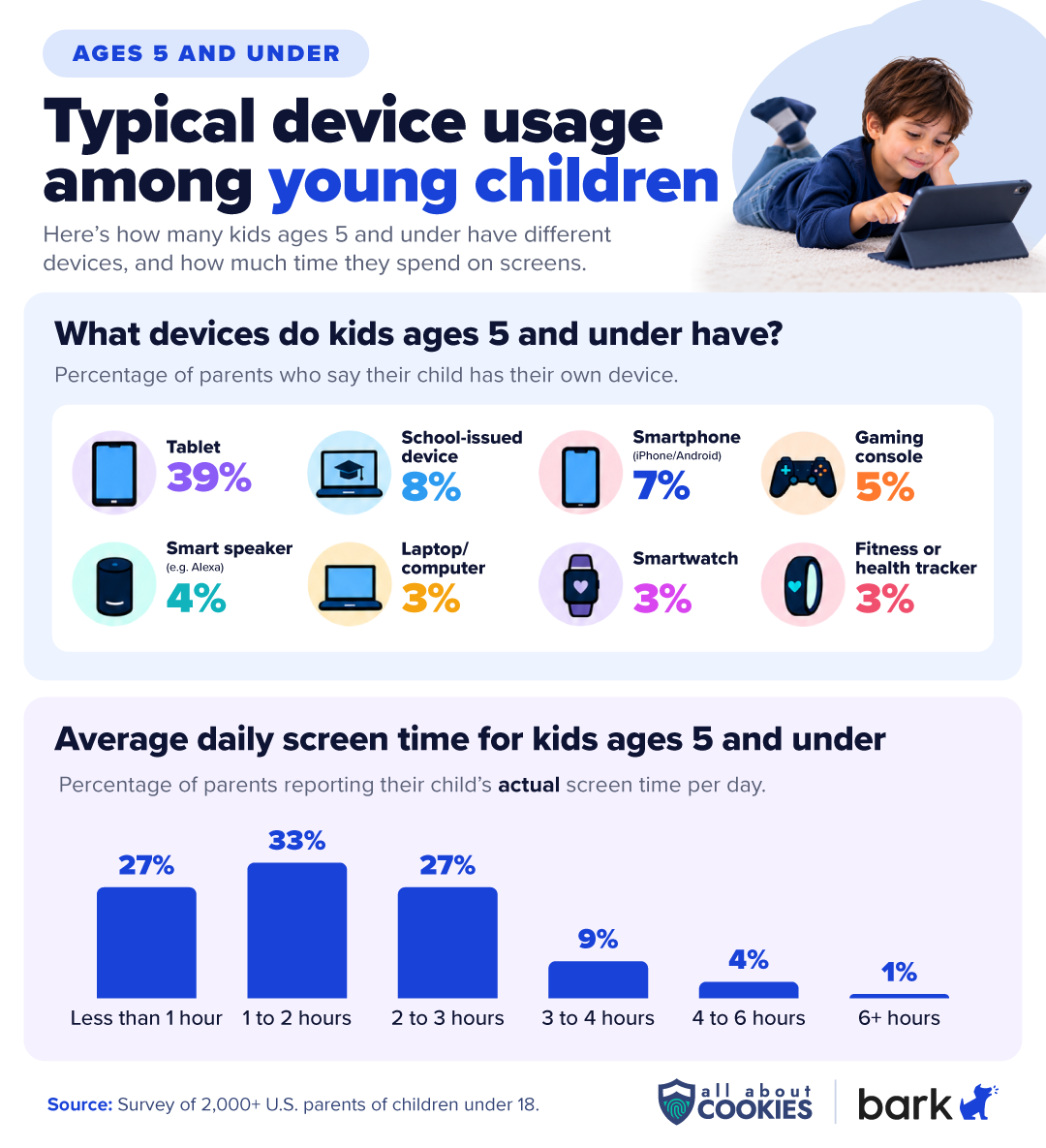
For the youngest kids, tech mostly means tablets and shared family devices. 39% of kids 5 and under have their own tablet, but few have their own phone (7%) or gaming console (5%). Most of their access is through devices the family shares.
Among parents of young kids who have their own device, 70% say they gave it to keep them entertained or occupied, far ahead of any other reason. This is also the age group most likely to say their child got a device earlier than planned (58%).
Screen time is where parents feel the gap. The most common answer for actual daily screen time was 1 to 2 hours, but the most common answer for the ideal was less than 1 hour. 14% of kids aged 0-5 spend 3 or more hours a day on screens, versus 8% of parents who think that much is ideal.
At this age, the introduction of electronics isn’t necessarily giving kids their own devices: they’re more frequently using devices from someone else in the household. For instance, while just 39% of kids 0-5 have their own tablet, an additional 25% have access to one, making total access to tablets 64% among kids 0-5. Video games are similar: while just 5% of kids 0-5 have their own consoles, an additional 27% have shared access to consoles in the house.
Luckily, there are still ways to make sure even shared devices are safer with router-based monitoring systems like Bark Home. It plugs into a home Wi-Fi router and lets parents set screen time schedules and block sites and apps on TVs, consoles, tablets, and computers.
How many kids have device access, ages 0-5
Device
Has their own
Shared
Total access
Tablet
39%
25%
64%
Smart speaker
4%
33%
37%
Smartphone
7%
29%
36%
Gaming console
5%
27%
33%
Laptop/computer
3%
21%
24%
Kid-safe phone
9%
13%
21%
School-issued device
8%
4%
12%
Smartwatch
3%
3%
6%
Fitness tracker
3%
2%
5%
Elementary-aged kids (6-9 years old)
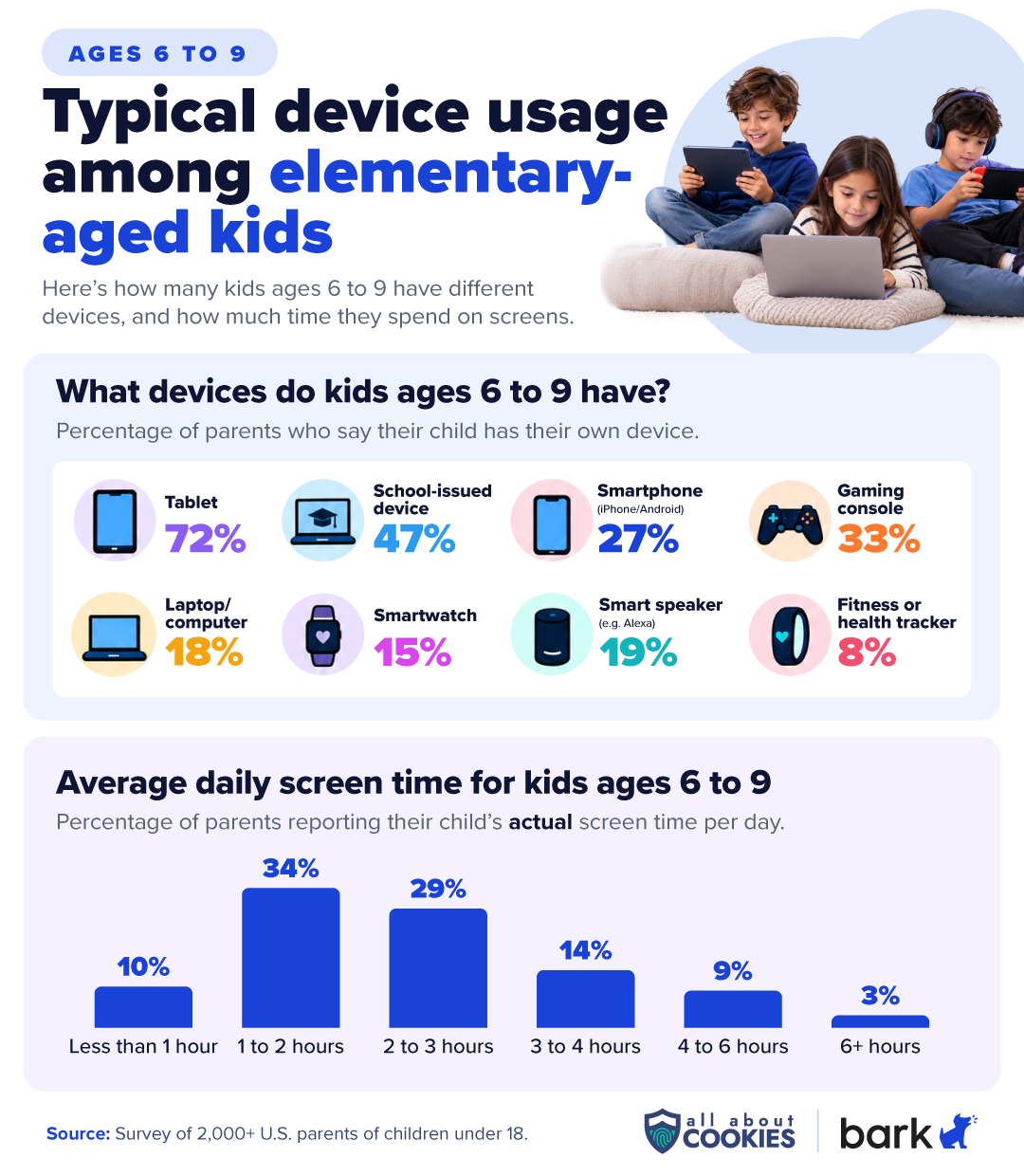
Between 6 and 9, devices start becoming personal. 72% of kids in this group have their own tablet, 47% have a school-issued device, and 33% have their own gaming console. Smartphones are still the exception, with just over 1 in 4 (27%) having their own.
Entertainment is still the top reason parents give a first device (64%), but safety is gaining ground: 32% say they wanted to be able to reach their child or check on their safety. This is especially seen through the adoption of smartphones in this age group, jumping from just 7% in kids under six to 27% in elementary school.
Among elementary-aged kids, screen time climbs too. 1 in 4 (26%) of kids aged 6-9 spend 3 or more hours a day on screens, compared to just 15% of parents who say that’s the right maximum.
For parents who want to reach their child without handing over a full smartphone, a smartwatch can split the difference. The Bark Watch, for example, offers calls, texts, and GPS location tracking, with no browser, social media, or games.
How many kids have device access, ages 6-9
Device
Has their own
Shared
Total access
Tablet
72%
18%
90%
Gaming console
33%
45%
78%
Laptop/computer
18%
43%
61%
Smartphone
27%
31%
58%
Smart speaker
19%
37%
56%
School-issued device
47%
7%
54%
Kid-safe phone
18%
14%
32%
Smartwatch
15%
6%
21%
Fitness tracker
8%
7%
15%
Tweens (10-12 years old)
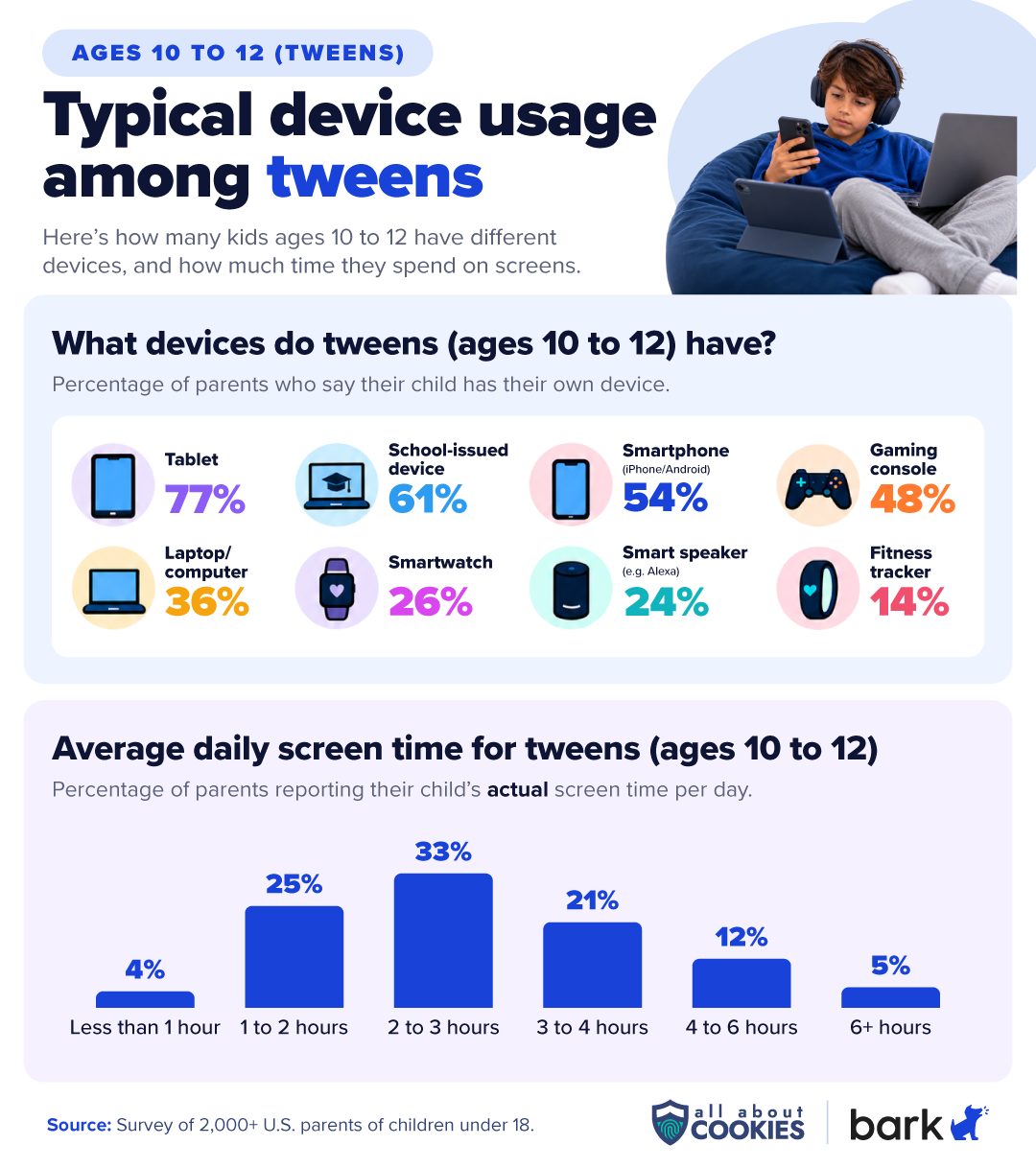
The tween years are when smartphones really start to arrive. 54% of 10- to 12-year-olds have their own smartphone, the first age group where a majority do, and 61% have their own school-issued device.
This is also the age where the “why” changes. Entertainment (49%) and being able to reach them or check on their safety (48%) are nearly tied as the top reasons parents gave a first device.
Here’s the full breakdown of why parents of tweens gave their child a first device:
Entertainment/keeping them occupied: 49%
Being able to reach them/check on their safety: 48%
Needed for school: 19%
They asked repeatedly: 17%
They did something to earn it: 16%
Coordinating schedules and rides: 16%
Gift from a relative or co-parent: 15%
All their friends had one: 12%
The screen time gap widens further at this stage. 39% of tweens spend 3 or more hours a day on screens, more than double the 16% of parents who think that’s appropriate.
Tweens are the most closely watched group: 98% of their parents monitor their tech use, and their parents are also the most likely to worry about screen addiction, coming in at 83%.
For those who are still on the fence about giving a tween their own cell phone, the Bark Phone is a nice middle ground. It gives them access to a phone with text and talk capabilities, but you determine if it can access additional apps like a web browser and social media.
How many kids have device access, ages 10-12
Device
Has their own
Shared
Total access
Tablet
77%
16%
94%
Gaming console
48%
35%
83%
Laptop/computer
36%
45%
81%
Smartphone
54%
23%
77%
School-issued device
61%
5%
66%
Smart speaker
24%
33%
56%
Kid-safe phone
22%
12%
34%
Smartwatch
26%
5%
31%
Fitness tracker
14%
4%
18%
Teenagers (13-17 years old)
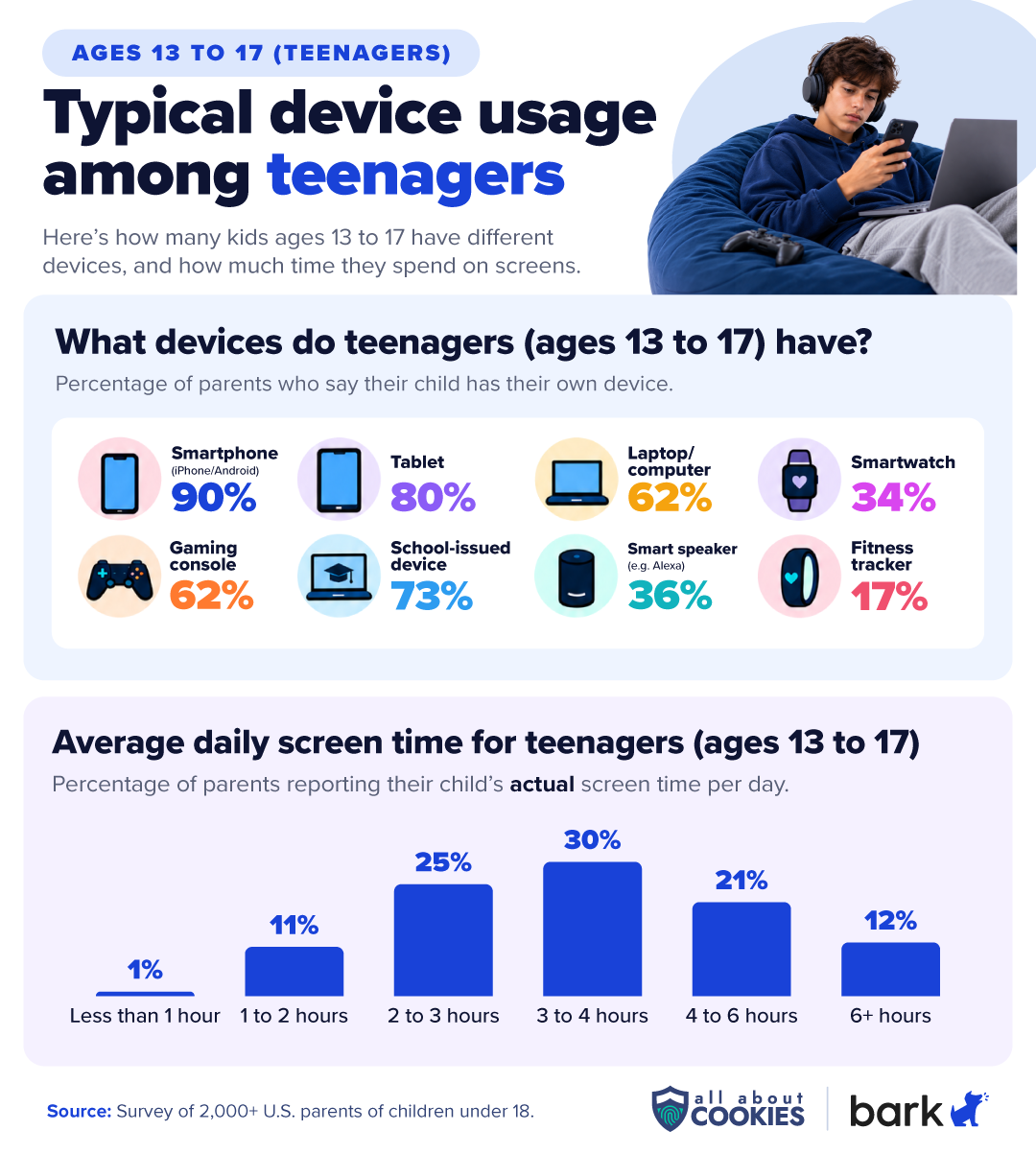
By the teen years, nearly every kid is connected. 90% of teens have their own smartphone, and 97% have access to one. Most also have access to a laptop (90%), a gaming console (88%), and a school-issued device (75%).
For parents of teens, safety is the clear reason for a first device: 64% say they wanted to be able to reach their child or check on their safety, compared to 38% who cited entertainment. Coordinating schedules and rides (21%) also rises with age. This is a major deviation from younger groups, which tend to receive their devices for entertainment (or to keep them busy).
Screen time is highest here. 63% of teens spend 3 or more hours a day on screens, and 12% spend 6 or more hours. By comparison, 30% of parents of teens think 3 or more hours is the right maximum.
Concerns also shift with age: distraction from schoolwork (20%) and poor sleep (16%) are roughly twice as common among parents of teens as among parents of kids under 10.
At this age, the Bark App can help monitor and protect your teen without invading their privacy. It screens across 30+ alert categories, like bullying and self-harm, and alerts you without providing all the details. It also has built-in safety features like location tracking, content filtering, and even lets you manage screen time.
How many kids have device access, ages 13-17
Device
Has their own
Shared
Total access
Smartphone
90%
7%
97%
Tablet
80%
12%
92%
Laptop/computer
62%
28%
90%
Gaming console
62%
26%
88%
School-issued device
73%
2%
75%
Smart speaker
36%
31%
67%
Smartwatch
34%
2%
36%
Kid-safe phone
25%
7%
32%
Fitness tracker
17%
5%
22%
Parents’ biggest tech worries, by age
Across every age group, sexual or inappropriate content is parents’ top concern, followed by addictive or compulsive use. Other concerns rise and fall as kids grow.
Parents biggest concerns about device usage, age group
Concern
0-5 years old
6-9 years old
10-12 years old
13-17 years old
All parents
Sexual or inappropriate content
53%
44%
45%
44%
46%
Addictive or compulsive use
43%
41%
38%
33%
39%
Contact with strangers
33%
33%
38%
32%
34%
Too much screen time
35%
32%
30%
27%
31%
Mental health
27%
28%
25%
26%
27%
Cyberbullying
15%
19%
24%
19%
19%
Violent content
20%
19%
15%
13%
17%
Less physical activity
11%
17%
17%
16%
16%
Less in-person social time
17%
15%
12%
18%
15%
Distraction from schoolwork
9%
9%
16%
20%
14%
Privacy and data collection
10%
14%
12%
11%
12%
Poor sleep
8%
8%
8%
16%
10%
Scams and hackers
8%
10%
9%
13%
10%
AI chatbots
3%
3%
2%
3%
3%
When asked if they’ve ever worried their child was addicted to their phone, screens, or social media, 74% of parents said yes, and these rates tend to rise as children get older.
Parental control tools can help. Bark, for example, lets parents set custom screen time schedules for school, bedtime, and free time, or pause everything with one tap. With the Bark Assistant, parents can make changes by typing simple requests like “Turn on bedtime at 9 pm” or “Disable streaming apps during bedtime,” instead of digging through settings.
For families who want firmer limits, the Bark Phone adds daily screen time limits and app time limits for individual apps or whole categories. Those controls are tamper-proof, so kids can’t simply turn them off. And because screen time doesn’t only happen on phones, Bark Home extends schedules to TVs, gaming consoles, tablets, and computers on the home Wi-Fi network.
Most parents monitor their kids’ tech, and most say it helps
91% of parents say they monitor their child’s tech use in some way. That includes 81% of parents of kids 5 and under, 95% of parents of 6- to 9-year-olds, 98% of parents of tweens, and 88% of parents of teens.
The most common methods parents monitor are manual: 57% physically check their child’s device, and 46% use built-in device controls like Apple Screen Time or Google Family Link. Fewer use location sharing (27%), in-app parental tools (26%), or a third-party parental control app (15%).
What parents monitor, by age
What parents monitor changes as kids grow. Parents of young kids focus on app usage and time, while parents of tweens and teens shift toward texts, browsing history, location, and social media.
What parents monitor
0-5 years old
6-9 years old
10-12 years old
13-17 years old
App usage and time
54%
66%
61%
49%
Browsing/search history
34%
57%
70%
57%
App downloads
34%
59%
63%
51%
Texts/messages
21%
39%
68%
63%
Location
17%
32%
52%
68%
Calls/contacts
19%
33%
53%
46%
Social media activity
18%
26%
44%
51%
Photos/camera roll
21%
37%
44%
34%
In-game chat
11%
30%
38%
21%
AI chatbot conversations
10%
14%
22%
15%
Email
8%
10%
21%
18%
Other
22%
6%
3%
1%
Most parents aren’t monitoring their kids’ tech usage in secret, either. 77% of parents who monitor say they’ve told their child, rising to 86% among parents of tweens, showing a level of transparency that helps facilitate important conversations about tech and device safety between parents and their kids.
Does monitoring your kids’ tech work?
Parents who monitor say it does. 37% of parents who monitor say it has helped them discover something concerning, rising to 46% among parents of tweens and teens.
Parents who monitor also say it pays off beyond catching problems:
88% say it gives them peace of mind
74% say it has helped them make better parenting decisions
69% say it has led their child to make better decisions about tech use
50% say it has improved communication with their child
Only 15% say monitoring has caused conflict and hurt trust, and most parents who monitor report positive experiences, especially when they’re open with their child about it.
Checking a device by hand only catches what a parent happens to see. Tools like the Bark App work differently: instead of parents reading everything, Bark uses AI to scan texts, emails, web activity, and more on 30+ social media apps, then sends an alert when it spots a potential issue, like bullying or contact with a stranger. On iPhones and iPads, Apple’s privacy rules limit what third-party apps can see, so Bark offers an optional smart charger, the Bark Sync, that scans the device each time it’s plugged in.
How to set your family up for safer screen time
Our data suggests most parents are trying to stay involved but often working with tools that weren’t built for the job. A few tips from our experts:
Make the plan before the device arrives. 45% of parents gave their kids devices earlier than planned. Decide on rules, screen time limits, and which apps are allowed before the device is in your child’s hands, not after.
Set up controls before you wrap it. Only 42% of parents giving tech gifts plan to set up parental controls before giving the gift. Doing it first means your child’s first experience with the device already includes the guardrails.
Match the device to the age. Kids don’t need a full smartphone to stay in touch. A watch or a phone limited to talk and text can cover safety needs, with more freedom added as kids show they’re ready.
Be open about monitoring. 77% of parents who monitor have told their kids, and only 15% say monitoring has caused conflict. Explaining why you’re watching can make it part of the relationship rather than a source of tension.
Look beyond built-in controls. If your child has found a way around the native controls on their device, or uses apps those controls don’t reach, a dedicated tool may be worth a look.
More about Bark
Bark offers parental control tools for kids at different stages, from a first watch to a teen’s smartphone.
What does Bark monitor?
The Bark App scans texts, email, web activity, and more than 30 social media apps for potential dangers, using AI that reads context rather than just keywords. When it finds something concerning, it sends parents an alert along with recommendations for how to handle it. Parents can also set screen time schedules, block websites and apps, and track their child’s location.
How much does Bark cost?
Bark App: $14 per month or $99 per year, with a 7-day free trial. One subscription covers unlimited kids and devices.
Bark Phone (A16): $360 upfront for the device + Bark plans from $29 per month.
Bark Phone Pro (A37): $600 upfront for the device + Bark plans from $29 per month.
Bark Watch (Samsung Galaxy Watch8): $288 upfront for the device + Bark talk and text service for $15 per month.
Bark Home: $6 per month or $79 as a one-time purchase.
How is the Bark Phone different from adding the Bark App to a phone?
On the Bark Phone, Bark’s software is built in and can’t be deleted, so controls are tamper-proof. It also offers features the app doesn’t, including contact approvals, app install approvals, remote alarms, and daily screen time limits.
Does Bark work on iPhones?
Yes, with some limits. On iPhones and iPads, the Bark App can manage screen time, block websites and apps, and track location. Apple’s privacy restrictions limit what third-party apps can monitor directly, so for deeper monitoring of texts, photos, and videos, Bark offers the Bark Sync, a smart charger that scans the device each time it’s plugged in. It costs $6 per month or $49 per year and requires a Bark App subscription.
To compile the data in the 2026 Kids and Tech Study, the All About Cookies research team surveyed 2,013 U.S. parents of children under 18 via the online research platform Prolific in October 2026. Parents with more than one child were asked to answer about their oldest child. Results were not weighted. This study was conducted by All About Cookies as part of a sponsored content relationship with Bark.
The average age kids first receive each device is based only on parents whose child currently has their own version of that device. Questions about why parents gave a first device, and whether it came earlier than planned, were asked only of parents whose child has their own device. Questions about monitoring outcomes were asked only of parents who monitor their child’s tech use.
Some questions used 1 to 5 agreement scales, with 4 and 5 representing levels of agreement and 1 and 2 representing levels of disagreement. Where this piece cites a combined percentage (for example, “88% say monitoring gives them peace of mind”), it reflects the sum of the “mostly/completely agree” and “somewhat agree” responses.
Because no children were surveyed as part of this survey, we asked parents to disclose the age and gender of their children, listed as follows:
Child's age
% of respondents
Raw #
0-5 years old
21%
432
6-9 years old
27%
543
10-12 years old
24%
485
13-17 years old
27%
553
Child's gender
% of respondents
Raw #
Male
50%
1009
Female
49%
990
Non-binary
0%
7
Prefer not to say
0%
7
For press inquiries, please contact the All About Cookies research team at press@allaboutcookies.org.
4.7
AllAboutCookies writers and editors score products based on a number of objective features as well as our expert editorial assessment. Our partners do not influence how we rate products.
Kate Quinlan is a Senior Editor at All About Cookies, where she has tested dozens of digital security tools and contributed to 500+ articles on data security, web building & hosting, VPNs, ad blockers, parental controls, and more. Before joining AAC, she managed a team of more than 150 writers at SuperSummary, where she developed editorial standards at scale. She holds a B.A. in Professional Writing from Kutztown University.