Are Apple and Google Parental Controls Enough? What Parents Say Is Missing
Apple Screen Time and Google Family Link offer useful safeguards, but our survey reveals where parents want more protection and what built-in controls may be missing.
We receive compensation from the products and services mentioned in
this story, but the opinions are the
author's own. Compensation may impact where offers appear. We have not included all available products or offers.
Learn more about
how we make money
and
our editorial policies.
Advertiser Disclosure
All About Cookies is an independent, advertising-supported website. Some of the offers that appear on this
site are from third-party advertisers from which All About Cookies receives compensation. This compensation
may impact how and where products appear on this site (including, for example, the order in which they
appear).
All About Cookies does not include all financial or credit offers that might be available to consumers nor
do
we include all companies or all available products. Information is accurate as of the publishing date and
has
not been provided or endorsed by the advertiser.
Close
Editorial Policy
The All About Cookies editorial team strives to provide accurate, in-depth information and reviews to help
you, our reader, make online privacy decisions with confidence. Here's what you can expect from us:
All About Cookies makes money when you click the links on our site to some of the products and offers that
we mention. These partnerships do not influence our opinions or recommendations. Read more about how we
make money.
Partners are not able to review or request changes to our content except for compliance reasons.
We aim to make sure everything on our site is up-to-date and accurate as of the publishing date, but we
cannot guarantee we haven't missed something. It's your responsibility to double-check all information
before making any decision. If you spot something that looks wrong, please let us know.
Close
Apple Screen Time and Google Family Link make it easier to manage what kids do on their devices. But setting screen time limits and approving apps doesn't necessarily tell you what happens inside them.
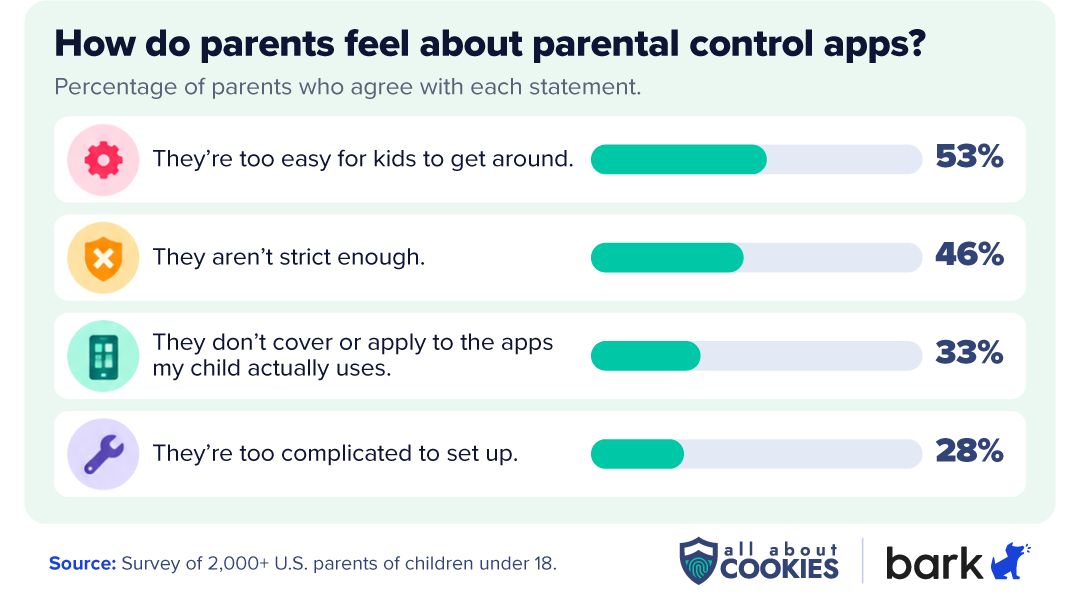
In our 2026 Kids and Tech Study, All About Cookies partnered with Bark to survey 2,013 U.S. parents. We found that 53% believe built-in parental controls are too easy for kids to get around, while 46% said they aren't strict enough. Those concerns raise an important question: Are Apple's and Google's free protections enough, or do parents need additional safeguards?
Apple Screen Time and Google Family Link can be enough for parents who primarily want to manage screen time, app access, and content restrictions. But families looking for more visibility into their children's online conversations and activities may need additional parental control tools.
Where built-in Apple and Google parental controls fall short
Apple Screen Time and Google Family Link have notable limitations. When we asked parents how they felt about the built-in parental control apps they’ve used in the past, they identified several frustrations: restrictions that are too easy to bypass (53%), protections that aren't strict enough (46%), limited coverage of the apps their children use (33%), and complicated setup (28%).
We also asked parents whether there were aspects of their children's technology use they wished they could monitor more easily. Among parents who monitor their children's technology use, 47% identified at least one activity they couldn't monitor or couldn't easily monitor.
Browsing and search history: 16%
In-game chats: 15%
Text messages and messaging apps: 15%
Social media activity: 14%
AI chatbot conversations: 11%
That gap becomes more noticeable as kids get older. Among parents of teens ages 13–17, 63% wanted better visibility into at least one activity, compared with 29% of parents of children ages 5 and under.
Let’s take a look at the top concerns of parents.
Kids can find ways around restrictions
In our survey, 53% of parents agreed that built-in parental controls are too easy for kids to get around. If you've ever noticed screen time limits not working on your child's device even after you confirmed your settings, you can probably relate.
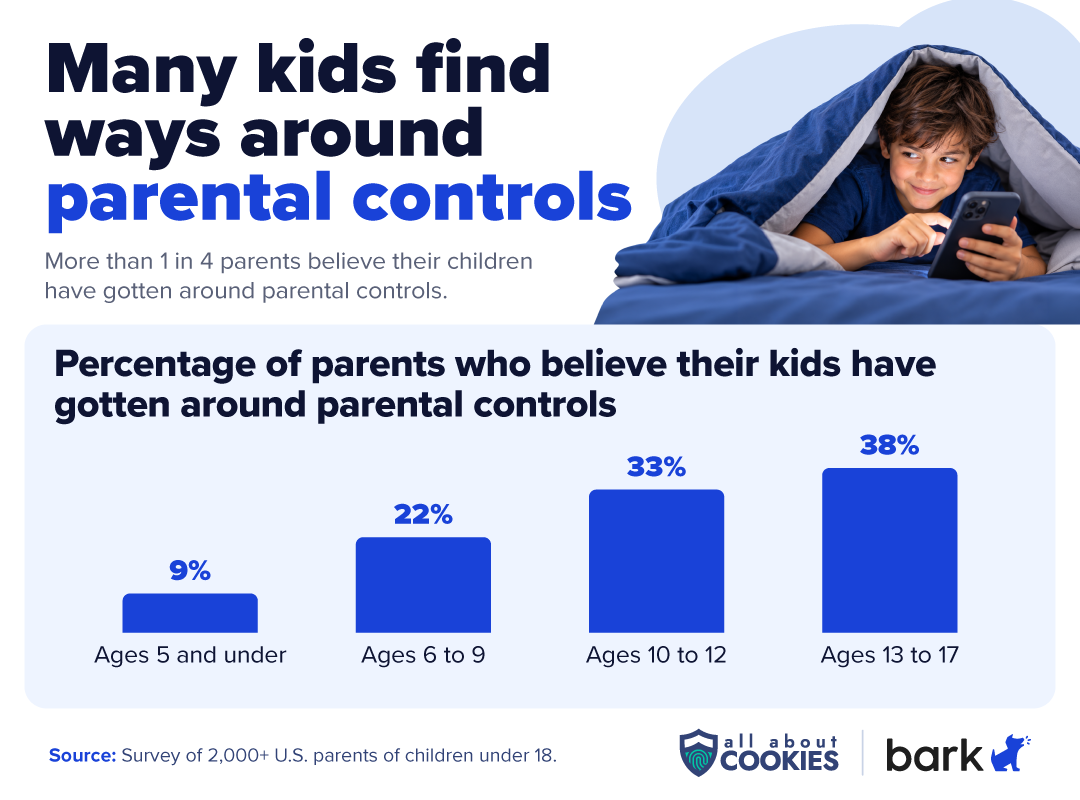
And some parents have experienced more than just frustration with their settings. Among parents who monitor their children's technology, 13% said their child had gotten around parental controls, while another 13% suspected it. Confirmed or suspected circumvention was more common among parents of teens (38%) than parents of children ages 5 and under (9%).
Of course, a screen time limit not working doesn't necessarily mean a child has deliberately bypassed it. Configuration issues and platform limitations can also play a role. Still, these findings show why it's worth revisiting parental control settings as children grow and their technology habits change.
For parents who need additional safeguards, third-party parental control apps can help supplement built-in restrictions. Our guide to keeping kids safer online covers other steps families can take.
How Bark helps: Bark gives parents additional ways to enforce screen time limits, restrict app access, and block inappropriate websites. Its parental control app is designed to be tamper-resistant, and parents can receive notifications if the VPN is disabled or the app stops working. Still, no parental control tool is completely foolproof, so it's important to review settings regularly and maintain open conversations about online safety.
They don't monitor every conversation
Apple Screen Time and Google Family Link help parents manage which apps their children can access, but they don't comprehensively monitor conversations within those apps. A child could still receive inappropriate messages, experience cyberbullying, or encounter unwanted contact through an approved messaging or social media app.
That doesn't mean built-in protections are absent. Apple offers Communication Limits to manage certain contacts and Communication Safety to detect nudity in supported photos and videos, plus gore and violence in FaceTime video messages. Google also offers sensitive-content warnings for images and videos that may contain nudity in Google Messages. However, these features don't provide parents with comprehensive visibility into potentially harmful conversations.
How Bark helps: Bark goes beyond app restrictions and screen time limits by analyzing supported communications for potential risks across 30+ alert categories, including bullying, self-harm, depression, and violence. Instead of simply restricting access, Bark can notify parents when it detects concerning content so they can decide whether to intervene.
They don’t cover the apps children actually use
Not every parental control works with every app. Apple Screen Time and Google Family Link can help parents restrict app downloads and manage access, but their controls don't necessarily extend to every feature within an app. This is especially challenging with social media platforms, online games, and other services with their own settings and safety tools.
We found that 33% of parents agreed that parental controls don't cover or apply to the apps their children actually use. Parents may need to set up additional protections within individual apps, especially for social media, messaging, and online gaming.
How Bark helps: Bark monitors supported social media platforms, messaging apps, and email accounts for potential concerns, including cyberbullying, sexual content, and contact with strangers. Parents receive alerts when Bark detects concerning activity, so they don't have to check each supported platform individually. Coverage varies by app, device, and setup.
They're too difficult to set up
Managing parental controls becomes more complicated when children use devices from different ecosystems. A parent might manage Screen Time on an iPhone, Family Link on a Chromebook, and separate settings on a gaming console. For parents juggling life, that’s additional work. Plus, it creates opportunities to muddle settings and can make it harder to maintain consistent rules. If you're setting up a new device for your child, our tech gifts for kids guide includes a checklist for configuring parental controls, privacy settings, and other safeguards before handing it over.
How Bark helps: Bark Home can manage internet access, website filtering, and schedules across devices connected to a family's home Wi-Fi, including computers, gaming consoles, and smart TVs. This can help families manage household internet rules across different types of devices, though content monitoring may require separate setup.
How apps like Bark fill the gaps
Many parents rely on free parental controls built into their children's devices, but those tools don't always address every concern.
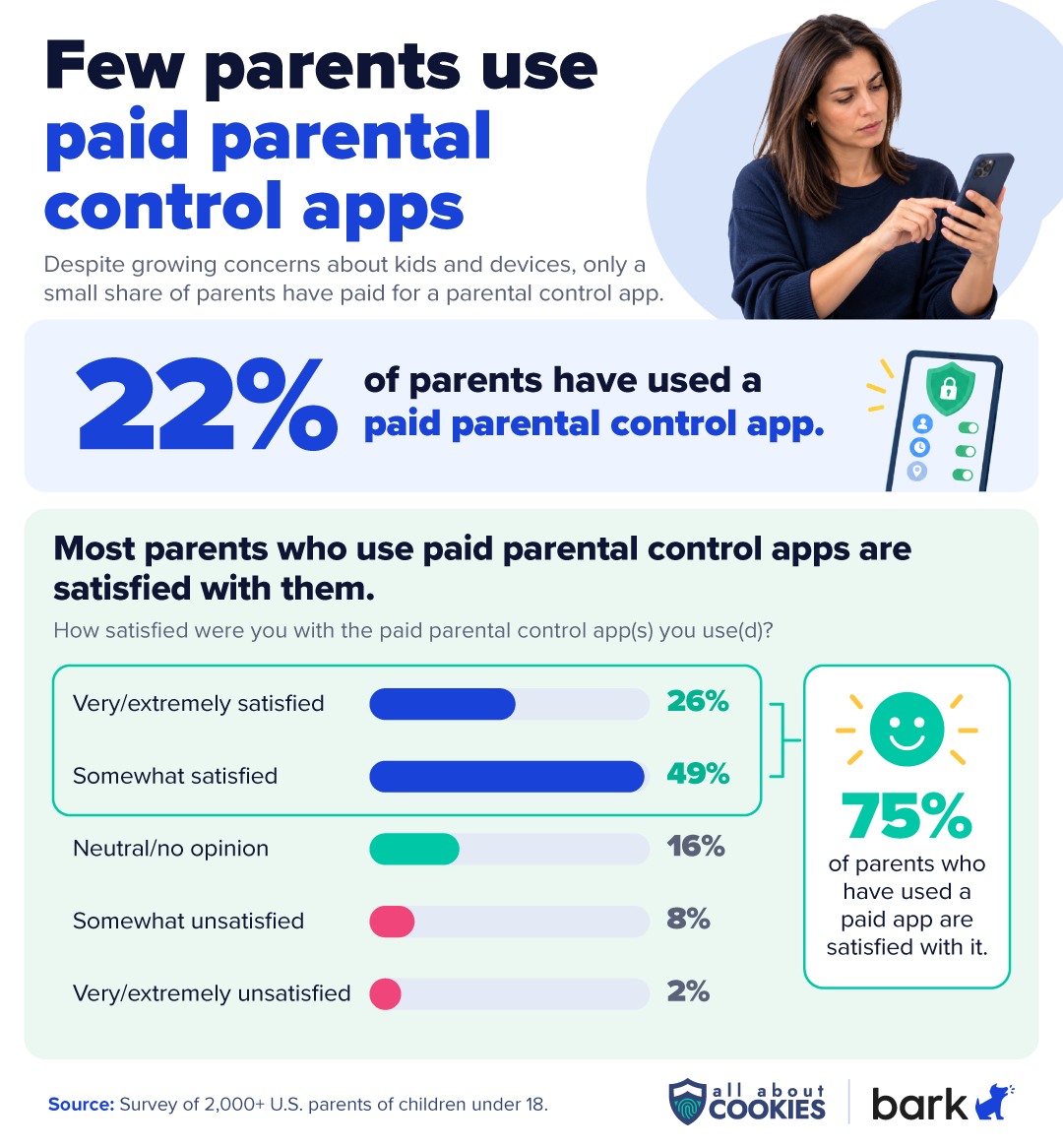
Parents who have tried paid parental controls generally report positive experiences. We found that 22% of parents had used a paid parental control app or service. Among those users, 75% were satisfied.
These parental control tools can complement Apple and Google's free protections by offering additional ways to monitor online activity and manage device use. If you're deciding whether to add monitoring to an existing phone or choose a dedicated device with parental controls built in, our guide to kids' phones vs. GPS watches vs. monitoring apps breaks down the options by age and readiness.
Bark parental controls is one option for families considering additional monitoring, whether through an app or a dedicated device. Here's how Apple Screen Time, Google Family Link, and Bark compare on key parental control features. Availability varies by device, app, and setup.
Feature
Featured
Bark
Apple Screen Time
Google Family Link
Screen time limits
Customizable schedules and daily limits
App restrictions
Block apps and manage access by schedule
Website and content filtering
Filter websites by category and block specific sites
Supported websites and content
Chrome and supported Google services
Messaging and social media safety
Scans supported texts, emails, and social media for concerns like cyberbullying, sexual content, and self-harm; alerts parents
Communication limits and sensitive-content warnings
Google Messages sensitive-content warnings
Cross-device management
iPhone, Android, Chromebooks, Kindle Fire tablets, and computers; Bark Home extends internet controls to TVs, gaming consoles, and other home Wi-Fi devices
Apple devices
Android and ChromeOS
Note: Features vary by device, app, subscription, and setup. Bark's content monitoring is more extensive on Android than iOS. Bark Home provides network-level controls for supported home Wi-Fi devices, not conversation monitoring.
How additional monitoring can fill the gaps
Alongside screen time management and content filtering, Bark's standout feature is content monitoring with alerts. Depending on the device and setup, Bark can scan supported text messages, emails, and social media activity for potential concerns, such as cyberbullying, inappropriate content, and contact with strangers. Parents can choose from 30+ alert categories, covering concerns such as bullying, body image, depression, self-harm, sexual content, violence, and more.
Neither Apple Screen Time nor Google Family Link offers comparable monitoring across supported messaging, social media, and email accounts. Apple does provide Communication Safety, which can detect certain sensitive photos and videos, including nudity and, in supported circumstances, gore or violence. However, it doesn't analyze conversations for the same range of potential concerns as Bark.
Bark's monitoring capabilities are more extensive on Android because Apple's privacy restrictions limit what third-party apps can access. To help address this, Bark offers Bark Sync, a separate smart charger that scans supported content on an iPhone or iPad when the device is plugged in. It can check texts, photos, videos, and certain other content for potential concerns, but alerts aren't instantaneous. Bark Sync also requires a Bark Premium subscription. Bark Home separately provides network-level controls for devices connected to a family's home Wi-Fi. For families considering a new device, the Bark Phone and Bark Watch offer built-in parental safety features, although their capabilities differ.
Whatever tools you choose, be realistic: third-party monitoring doesn't guarantee you'll detect every online risk. There's also a fine line between healthy parental oversight and outright spying on your children. Giving them age-appropriate autonomy, encouraging open conversations, and setting clear expectations are just as important.
4.7
AllAboutCookies writers and editors score products based on a number of objective features as well as our expert editorial assessment. Our partners do not influence how we rate products.
PROMOTION: Get $30 Off the Bark Phone or Watch with Code JOY30 thru Dec. 24
Parental controls app that monitors texts, email, and social media for signs of bullying, self-harm, depression, and predatory contact
Supports parental monitoring across smartphones, tablets, and computers, not just phones
Designed to be tamper-resistant, and parents are notified if the VPN is turned off or the app stops working
Read our comprehensive Bark review to decide whether it might be a good option for your family.
Bottom line
Apple Screen Time and Google Family Link are good starting points for managing screen time, app access, and content restrictions. But they have limitations, particularly when it comes to monitoring conversations, preventing workarounds, and managing devices across different platforms.
Before paying for additional parental controls, consider what you need to monitor and whether your existing tools already cover it. If you want more visibility into potentially concerning online activity, a dedicated monitoring app may help fill the gaps. Compare your options in our roundup of the best parental control apps.
FAQs
Can a child override parental controls on an iPhone?
Yes. Children can sometimes find ways around iPhone parental controls, although unexpected access may also result from gaps in the settings rather than deliberate circumvention. To reduce the risk, keep your child's iPhone updated, use a Screen Time passcode they don't know, and regularly review their restrictions as their needs change.
Can I monitor my child's iPhone from my iPhone?
Yes. With Apple's Family Sharing and Screen Time features, you can manage your child's screen time, app limits, content restrictions, and certain communication settings from your own iPhone. However, these tools don't let you remotely read their text messages or monitor everything they do within apps.
Can I see my child's text messages with Screen Time?
No. Apple Screen Time doesn't let parents read their child's text messages. Its Communication Limits feature can restrict who a child communicates with, while Communication Safety can detect certain sensitive photos and videos in supported apps and provide warnings. Neither feature gives parents access to message conversations. If you want alerts about potentially concerning messages, a third-party monitoring app may offer additional coverage, depending on the device and service.
Do I need a parental control app if I already use Apple Screen Time?
Not necessarily. Apple Screen Time may be enough if your main goals are managing screen time, approving apps, and restricting certain content. However, a third-party parental control app may be worth considering if your child also uses non-Apple devices or you want alerts about potentially concerning text messages and social media activity. Keep in mind that monitoring capabilities vary by service, app, and device, particularly on iPhones.
4.7
AllAboutCookies writers and editors score products based on a number of objective features as well as our expert editorial assessment. Our partners do not influence how we rate products.
Kate Quinlan is a Senior Editor at All About Cookies, where she has tested dozens of digital security tools and contributed to 500+ articles on data security, web building & hosting, VPNs, ad blockers, parental controls, and more. Before joining AAC, she managed a team of more than 150 writers at SuperSummary, where she developed editorial standards at scale. She holds a B.A. in Professional Writing from Kutztown University.