Kids Phone vs. GPS Watch vs. Monitoring App: Which Is Right for Your Child?
Choosing your child's first device? We compare kids' phones, GPS watches, and parental monitoring apps to help you decide what makes sense for their age, maturity, and communication needs.
We receive compensation from the products and services mentioned in
this story, but the opinions are the
author's own. Compensation may impact where offers appear. We have not included all available products or offers.
Learn more about
how we make money
and
our editorial policies.
Advertiser Disclosure
All About Cookies is an independent, advertising-supported website. Some of the offers that appear on this
site are from third-party advertisers from which All About Cookies receives compensation. This compensation
may impact how and where products appear on this site (including, for example, the order in which they
appear).
All About Cookies does not include all financial or credit offers that might be available to consumers nor
do
we include all companies or all available products. Information is accurate as of the publishing date and
has
not been provided or endorsed by the advertiser.
Close
Editorial Policy
The All About Cookies editorial team strives to provide accurate, in-depth information and reviews to help
you, our reader, make online privacy decisions with confidence. Here's what you can expect from us:
All About Cookies makes money when you click the links on our site to some of the products and offers that
we mention. These partnerships do not influence our opinions or recommendations. Read more about how we
make money.
Partners are not able to review or request changes to our content except for compliance reasons.
We aim to make sure everything on our site is up-to-date and accurate as of the publishing date, but we
cannot guarantee we haven't missed something. It's your responsibility to double-check all information
before making any decision. If you spot something that looks wrong, please let us know.
Close
All About Cookies, in partnership with Bark, surveyed 2,013 U.S. parents about their children’s tech use. One stat from our 2026 Kids and Tech Study jumped out: 49% of parents whose children already own a device said they wished they'd waited longer before giving their child their first personal device.
That feeling of wanting to time things perfectly is understandable, but in reality, there's no universally best age for a child's first phone or other smart device. Parents also don't need to get stuck in a binary. There's plenty of middle ground between no device and an unrestricted smartphone. GPS watches and kids' phones offer different levels of connectivity, while parental monitoring apps can add supervision to a phone your child already owns.
Choosing between a kids' phone, GPS watch, and monitoring app comes down to why your child needs a device, how much independence they're ready for, and what level of supervision makes sense for your family.
Kids' phone vs. GPS watch vs. monitoring app: Which should you choose?
Kids' phones, GPS watches, and parental monitoring apps offer different ways to balance connectivity and supervision, but they're not interchangeable. Here's when each makes sense:
Kids' phone: Best for children who need more communication options and potentially additional apps, but still benefit from built-in restrictions.
GPS watch: Best for children who need basic communication and location sharing without full smartphone functionality.
Parental monitoring app: Best for children who already have a compatible smartphone and need a supplemental layer of supervision.
Here's how their typical features compare. Keep in mind that capabilities vary by device and app.
Feature
Kids' phone
GPS watch
Monitoring app
Primary purpose
Smartphone access with built-in restrictions
Basic communication and location sharing
Additional supervision of an existing device
Calling and texting
Generally supported
Often limited to approved contacts
Uses the existing phone
Location tracking
Often available
Typically a core feature
Available on supported phones
Apps and browsing
Restricted or configurable
Usually limited or unavailable
Depends on the existing phone and app controls
Content monitoring
Varies by device and built-in protections
Typically limited
Varies by app and operating system
New device required?
Yes
Yes
No, if the child already has a compatible device
When a kids' phone makes sense
A kids' phone may be a better fit than a GPS watch if:
Your child needs regular calling and texting
You want more flexibility than a watch provides
Your child is ready for some apps or online features, but not necessarily unrestricted access
You want built-in controls over contacts, downloads, and screen time
Bark Phone offers a middle ground between a GPS watch and an unrestricted smartphone, with built-in parental controls that can change as your child gets older. Its Starter plan focuses on calling, texting, and location sharing, with no access to games, web browsing, or social media. The Advanced plan gives parents more flexibility to manage which apps and online features their child can use.
In our November 2026 testing, Bark Phone took less than 10 minutes to set up. Its built-in restrictions worked as expected: blocked apps were inaccessible, and we couldn't change restricted reset settings without a device code. Otherwise, the phone felt like a regular Android smartphone, with parental controls running in the background.
Keep in mind that the Bark Phone requires a separate device purchase and a monthly wireless plan, so consider the ongoing cost when comparing it with a GPS watch or an existing smartphone.
PROMOTION: Get $30 Off the Bark Phone or Watch with Code JOY30 thru Dec. 24
Smartphone with built-in parental controls for managing apps, contacts, screen time, and web access
Monitors texts and supported online activities for potential risks, including cyberbullying and predatory contact
Blocked apps stayed inaccessible in our testing, and restricted device settings required a parent code
When a GPS watch makes sense
A GPS watch may be a better fit than a kids' phone if:
Your child primarily needs a way to contact you or other approved adults
You want to check their location
Your child doesn't need web browsing, social media, or additional apps
Bark Watch provides calling, texting, and location sharing without the additional apps and online access that come with a smartphone.
In our November 2026 testing, Bark Watch (the Samsung Galaxy Watch8 model) took about 15 minutes to set up, and its GPS accurately identified our testing location. We could send texts to approved contacts using quick replies and voice-to-text. When we tested voice-to-text, the Bark Watch correctly transcribed our words. Messages from unapproved numbers were flagged for parental review, as were texts containing bullying language.
Like Bark Phone, Bark Watch requires a device purchase and an ongoing wireless service plan.
Your child already uses a compatible smartphone, tablet, or computer
You want more visibility into their messaging, social media, or other online activities
Your child is gaining independence but still needs some supervision
Built-in parental controls for Apple and Android devices don't always give parents the visibility they want. We found that 63% of parents of teens who monitor their children's technology said there's something they'd like to monitor more closely but currently can't, or can't easily.
Bark parental controls offer content monitoring, screen time restrictions, web filtering, and location tools, although available features vary by device. It monitors across 30+ alert categories, including bullying, sexual content, and self-harm. Bark Phone and Bark Watch also include built-in Bark protections, so families using those devices don't need to buy the standalone app separately.
In our July 2026 Android testing, Bark flagged potentially concerning searches, enforced app and website restrictions, and sent us an immediate notification when we completed a location check-in. We also found that removing the app required a code from the parent dashboard, making it harder for kids to uninstall it without permission. Parents can also receive notifications if the VPN is disabled or the app stops working.
Bark supports iPhones and iPads, although available monitoring features and setup steps vary by device. Learn more in our Bark parental controls review.
4.7
AllAboutCookies writers and editors score products based on a number of objective features as well as our expert editorial assessment. Our partners do not influence how we rate products.
PROMOTION: Get $30 Off the Bark Phone or Watch with Code JOY30 thru Dec. 24
Parental controls app that monitors texts, email, and social media for signs of bullying, self-harm, depression, and predatory contact
Supports parental monitoring across smartphones, tablets, and computers, not just phones
Designed to be tamper-resistant, and parents are notified if the VPN is turned off or the app stops working
How to choose based on your child's age and readiness
Age can be a useful starting point when choosing a device, but it shouldn't be the deciding factor. Every child has different communication needs, responsibilities, and levels of independence. Still, our survey revealed some interesting patterns in device ownership and parental supervision as children get older. Here's what those findings can tell us about choosing the right option for your family.
Young children 5 and under: Start with shared devices
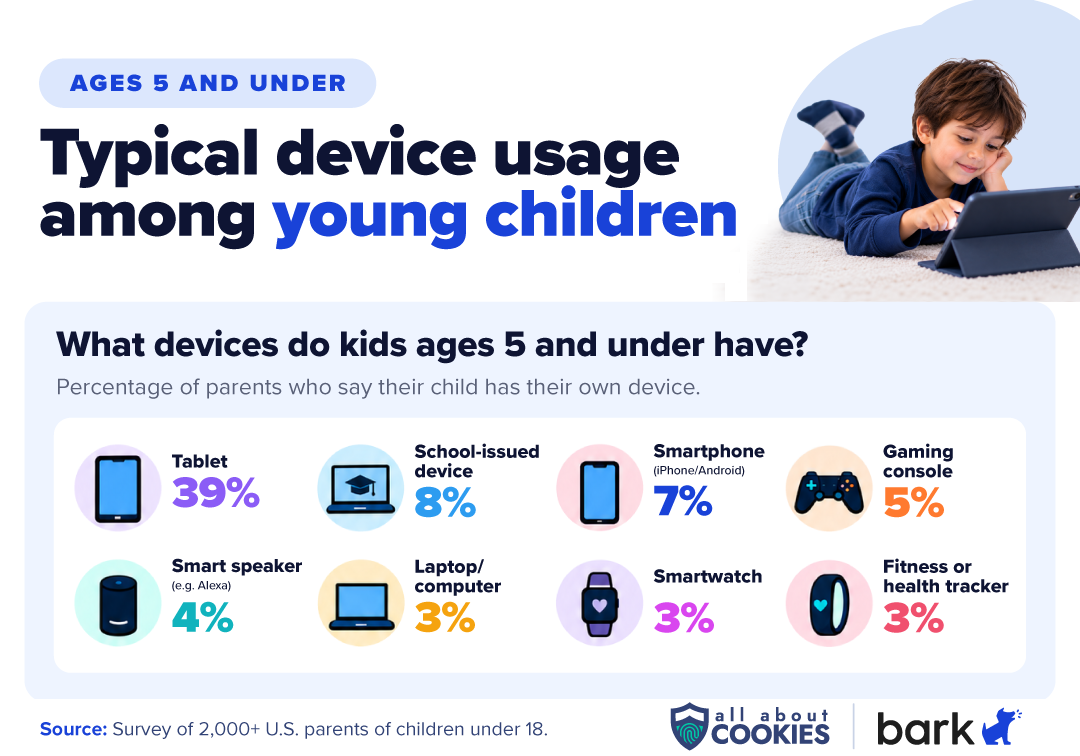
For children ages 5 and under, a personal phone or GPS watch may not be necessary. We found that 39% of children in this age group have their own tablet, while just 7% have a smartphone and 3% have a smartwatch.
At this age, shared family devices may be enough for watching videos, playing games, and exploring educational apps. Parents can use built-in parental controls to manage content and screen time without giving their child their own device.
If your child needs a way to contact you or another caregiver independently, a GPS watch could be worth considering. Otherwise, you don't need to add more connectivity than your family needs.
Elementary-aged children 6 to 9: Start with basic communication
We recommend the Bark Watch as a good fit for elementary-aged students. Among parents of children ages 6–9, 33% reported using a kid-safe device with built-in controls, compared with only 13% who indicated that they use a third-party parental control app.
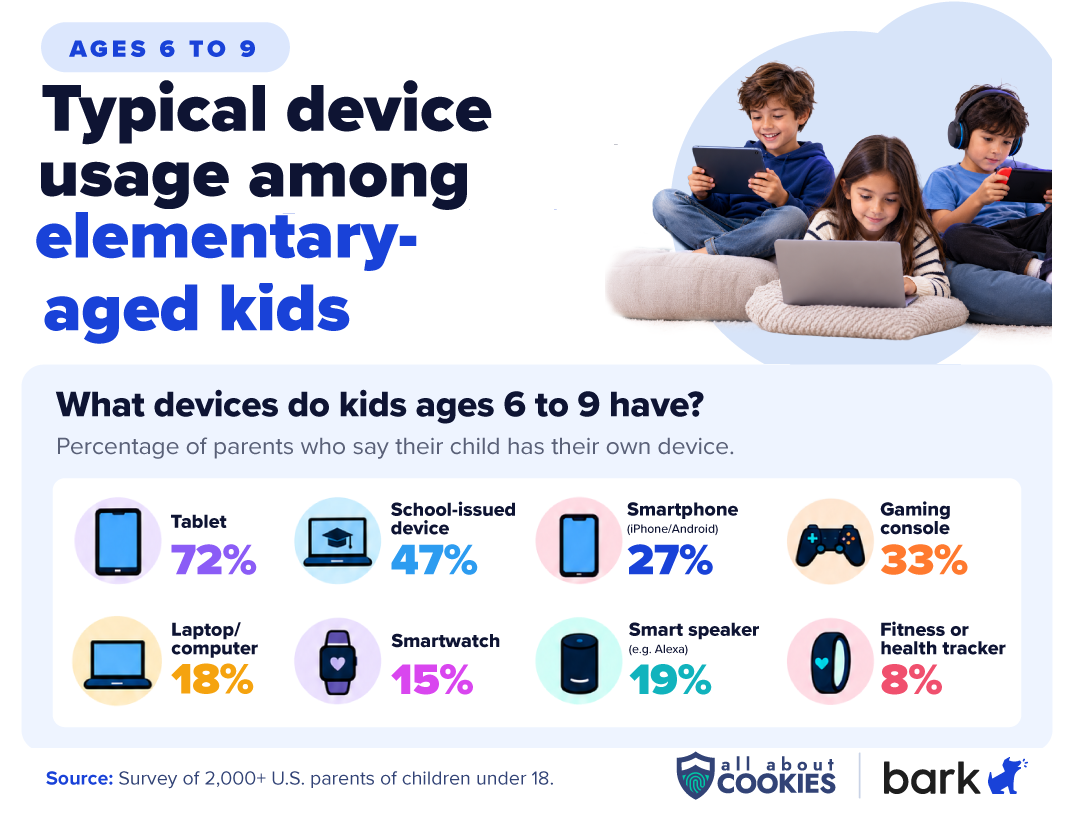
We also found that tablets are the most common personal device in this age group (72%), while 27% have a smartphone and 15% have a smartwatch.
If your child needs to contact you or another caregiver independently, such as after sports practice or school activities, a GPS watch may be enough. A kids' phone offers more flexibility if they need regular texting, calling, or additional apps.
Ultimately, your child's routine, ability to follow rules, and communication needs should matter more than reaching a specific age.
Tweens aged 10 to 12: Balance independence with restrictions
Bark has found that most Bark Phone kids start using the device between 10 and 12. As children approach middle school, they may need more ways to communicate, coordinate activities, and access online tools. We found that 61% of parents of children ages 10–12 use built-in device controls, while 31% use location sharing.
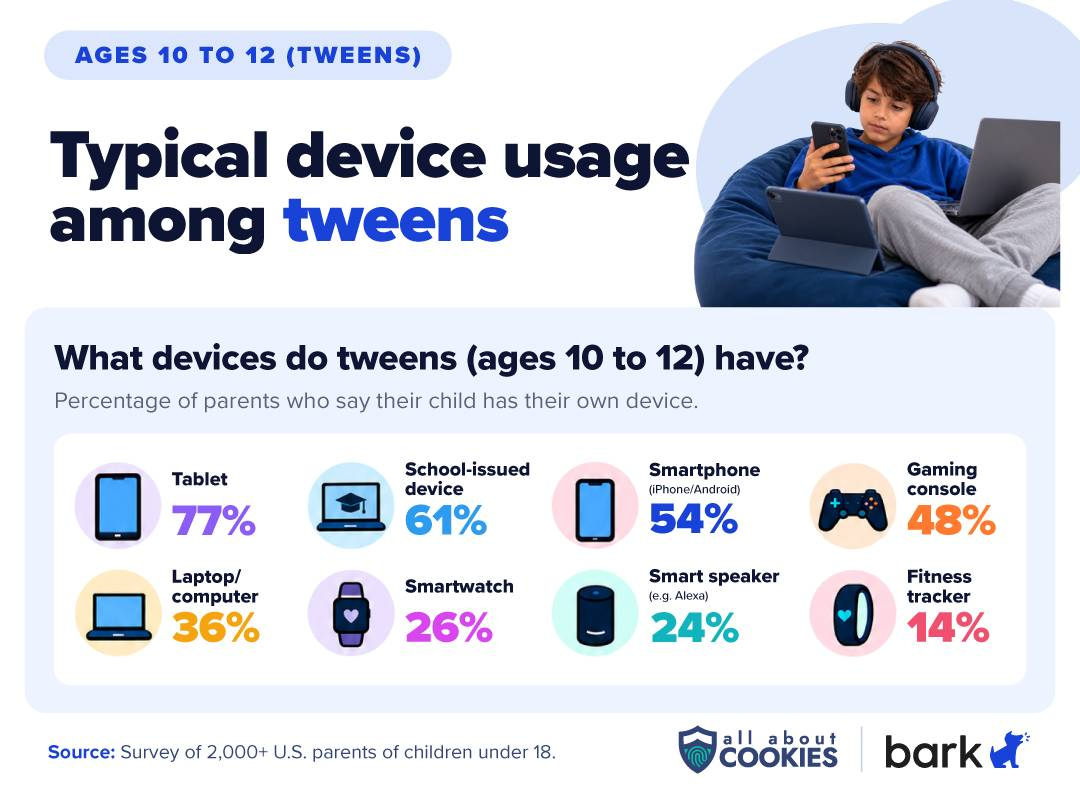
Smartphone ownership also increases considerably at this age. More than half (54%) of children ages 10–12 have their own smartphone, according to our survey.
Much of it comes down to how well parents set expectations around screen time, downloads, contacts, and general online behavior. For some families, a standard smartphone with parental controls may be enough, especially if their child follows agreed-upon rules and isn’t trying to bypass restrictions. A third-party monitoring app can provide additional supervision if needed.
For children who aren't ready for that level of access, a restricted kids' phone with more control over contacts, downloads, and apps may be the better choice.
Teens aged 13 to 17: Adjust supervision as independence grows
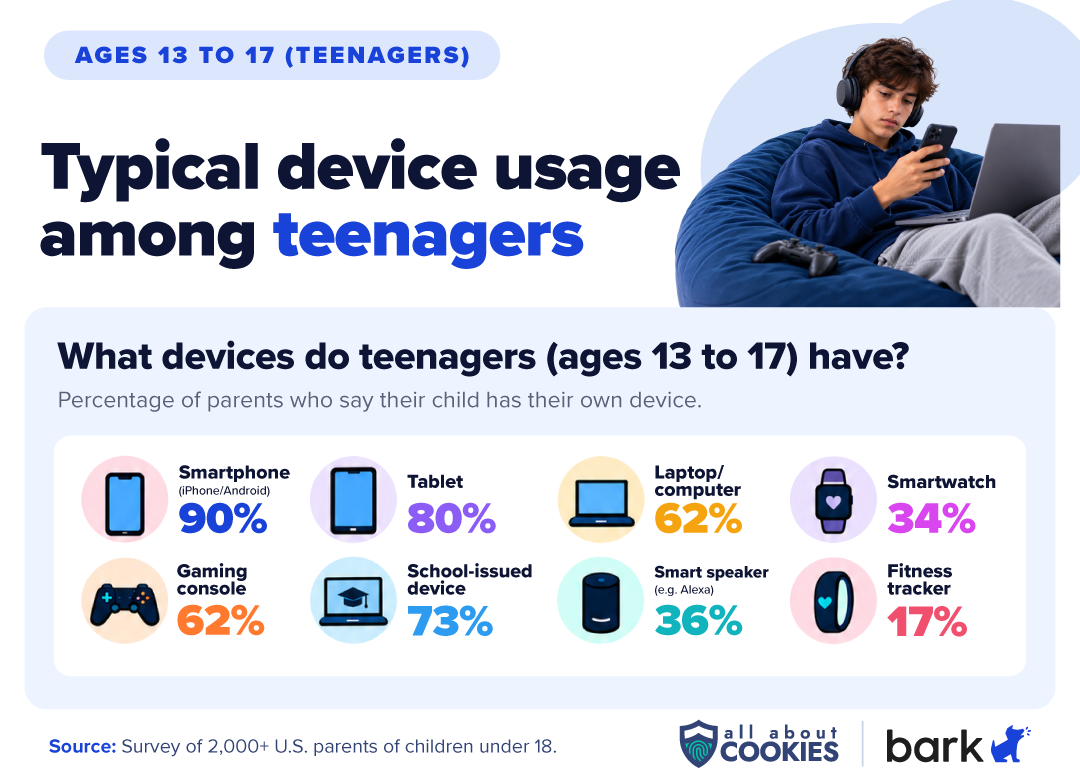
For teens who already own smartphones, adding monitoring tools may be more practical than switching to a dedicated kids' device. We found that 90% of teens ages 13–17 have their own smartphone, making it the most common personal device in this age group.
Parents' monitoring habits also change as children get older. Among parents of teens, 20% use third-party parental control apps, compared with 11% who use kid-safe devices with built-in controls. Nearly half (48%) use location sharing.
Communication and transparency can’t be overlooked: 77% of parents who monitor their child's technology say they've told their kid about it. Open conversations about monitoring can help families balance supervision with teens' growing independence and privacy.
Bottom line
Choosing between a kids' phone, GPS watch, and monitoring app can feel overwhelming, especially when you're trying to determine the right age for each option. There's no universally right age, but some general guidelines can help.
GPS watches are often enough for younger kids who need basic communication and location sharing, while kids' phones work better for slightly older kids who are ready for a phone with built-in restrictions. Monitoring apps for teenagers are popular because they can add supervision to a smartphone or laptop the teen already owns, although they don't offer the same built-in restrictions as dedicated kids' phones.
Above all, when parents choose a device to protect their children online, they should evaluate their child's current needs, readiness, and the level of connectivity they're comfortable introducing rather than an arbitrary age threshold.
FAQs
What is the best age for a child's first phone?
There is no universal best age. Every child and family has its own needs and dynamics that may justify or even require a phone purchase. If you want a crowdsourced ballpark number, our survey of 2,000+ U.S. parents identified 12.3 as the average ideal age for a standard smartphone. If you're shopping for a child's first device, our guide to tech gifts for kids also covers age-appropriate options and parental controls to consider before buying.
Is a GPS watch safer than a smartphone for kids?
A GPS watch generally offers fewer ways to access online content than a smartphone, since most kids' watches don't support web browsing, social media, or third-party apps. That can reduce exposure to certain online risks, although it doesn't eliminate concerns about privacy, unwanted contact, or location sharing.
Can a parental monitoring app replace a kids' phone?
Not exactly. A parental monitoring app adds supervision to a compatible device your child already uses, while a dedicated kids' phone comes with built-in restrictions. A monitoring app may be enough for families comfortable with their child's existing smartphone, but a kids' phone may make more sense if they want tighter control over apps, contacts, and device settings.
Is a kids' phone worth it if my child already has an iPhone or Android?
Maybe, depending on how well your child's current phone meets your family's needs. A kids’ phone is a better choice for parents with tech-savvy children who enjoy finding loopholes in software and need stronger monitoring. But built-in parental controls and third-party monitoring apps may provide enough supervision without purchasing another device. Consider a dedicated kids’ phone if you want more restrictions built into the device itself, particularly around app downloads, contacts, and settings.
Kate Quinlan is a Senior Editor at All About Cookies, where she has tested dozens of digital security tools and contributed to 500+ articles on data security, web building & hosting, VPNs, ad blockers, parental controls, and more. Before joining AAC, she managed a team of more than 150 writers at SuperSummary, where she developed editorial standards at scale. She holds a B.A. in Professional Writing from Kutztown University.