Tech Gifts for Kids: A Parent's Holiday Buying and Setup Guide
Our survey found that most parents value built-in parental controls, but fewer than half plan to set them up before gifting. Here's what to look for when buying tech gifts and how to prepare them for your child.
We receive compensation from the products and services mentioned in
this story, but the opinions are the
author's own. Compensation may impact where offers appear. We have not included all available products or offers.
Learn more about
how we make money
and
our editorial policies.
Advertiser Disclosure
All About Cookies is an independent, advertising-supported website. Some of the offers that appear on this
site are from third-party advertisers from which All About Cookies receives compensation. This compensation
may impact how and where products appear on this site (including, for example, the order in which they
appear).
All About Cookies does not include all financial or credit offers that might be available to consumers nor
do
we include all companies or all available products. Information is accurate as of the publishing date and
has
not been provided or endorsed by the advertiser.
Close
Editorial Policy
The All About Cookies editorial team strives to provide accurate, in-depth information and reviews to help
you, our reader, make online privacy decisions with confidence. Here's what you can expect from us:
All About Cookies makes money when you click the links on our site to some of the products and offers that
we mention. These partnerships do not influence our opinions or recommendations. Read more about how we
make money.
Partners are not able to review or request changes to our content except for compliance reasons.
We aim to make sure everything on our site is up-to-date and accurate as of the publishing date, but we
cannot guarantee we haven't missed something. It's your responsibility to double-check all information
before making any decision. If you spot something that looks wrong, please let us know.
Close
Christmas is a popular time to buy tech gifts for kids, but most parents miss the critical window to set them up safely. All About Cookies, in partnership with Bark, surveyed 2,013 U.S. parents. Among parents planning to give their children tech gifts, 81% consider built-in parental controls important, but fewer than half (42%) plan to set them up before handing over the devices.
In this holiday guide, we'll explore why parental controls matter for your kids' new tech devices, what to consider when setting them up, and how to choose the right protections for your family.
Our 2026 Kids and Tech Study found that 42% of parents intend to configure parental controls before handing off a new device. Another 34% plan to do it the day they gift it, and 12% plan to do it sometime afterward.
Any setup is better than none, but doing it beforehand has real advantages. You can review restrictions, install updates, and test settings without feeling rushed or having an excited kid waiting over your shoulder. Your child’s first experience with the device then happens with guardrails already in place, not after they’ve accessed something they shouldn’t have.
Early setup is also your best chance to address what parents told us worries them most:
Inappropriate content (46%)
Addictive screen use (39%)
Contact with strangers (34%)
No single setting covers every risk, but configuring parental controls beforehand can help reduce your child's exposure to all three.
Before you wrap it: 6 steps to secure your child's new device
1. Create a child account. Set up the appropriate child profile or connect the device to an existing family account.
2. Update the device. Install available operating system and security updates.
6. Test the settings. Confirm that restrictions work as expected from the child's account before handing over the device.
Safety features to check on popular tech gifts
Our survey found that gaming consoles and tablets top parents' holiday tech gift lists, although 20% are still deciding which device to buy. Among parents who are planning to give their child a tech gift this Christmas, here are the most popular options:
A gaming console (34%)
Tablet (30%)
Smartphone (21%)
VR headset (18%)
Laptop (16%)
Smartwatch (16%)
Kid-safe phone (15%)
Every device comes with different risks. Smartphones, tablets, and laptops offer web access, while gaming consoles and VR headsets may allow kids to communicate with strangers through online multiplayer games. Some devices also share location data or allow in-app purchases.
When you evaluate tech gifts for kids, consider their safety features alongside their entertainment, communication, and educational benefits. The table below highlights what to look for, although available controls vary by device.
Web filtering, child accounts, software permissions
Smartwatch
Location sharing and communication
Approved contacts, location controls
Kid-safe phone
Features that exceed a child's readiness
Adjustable app access, contact approvals, screen time limits
Choosing a tech gift based on age and readiness
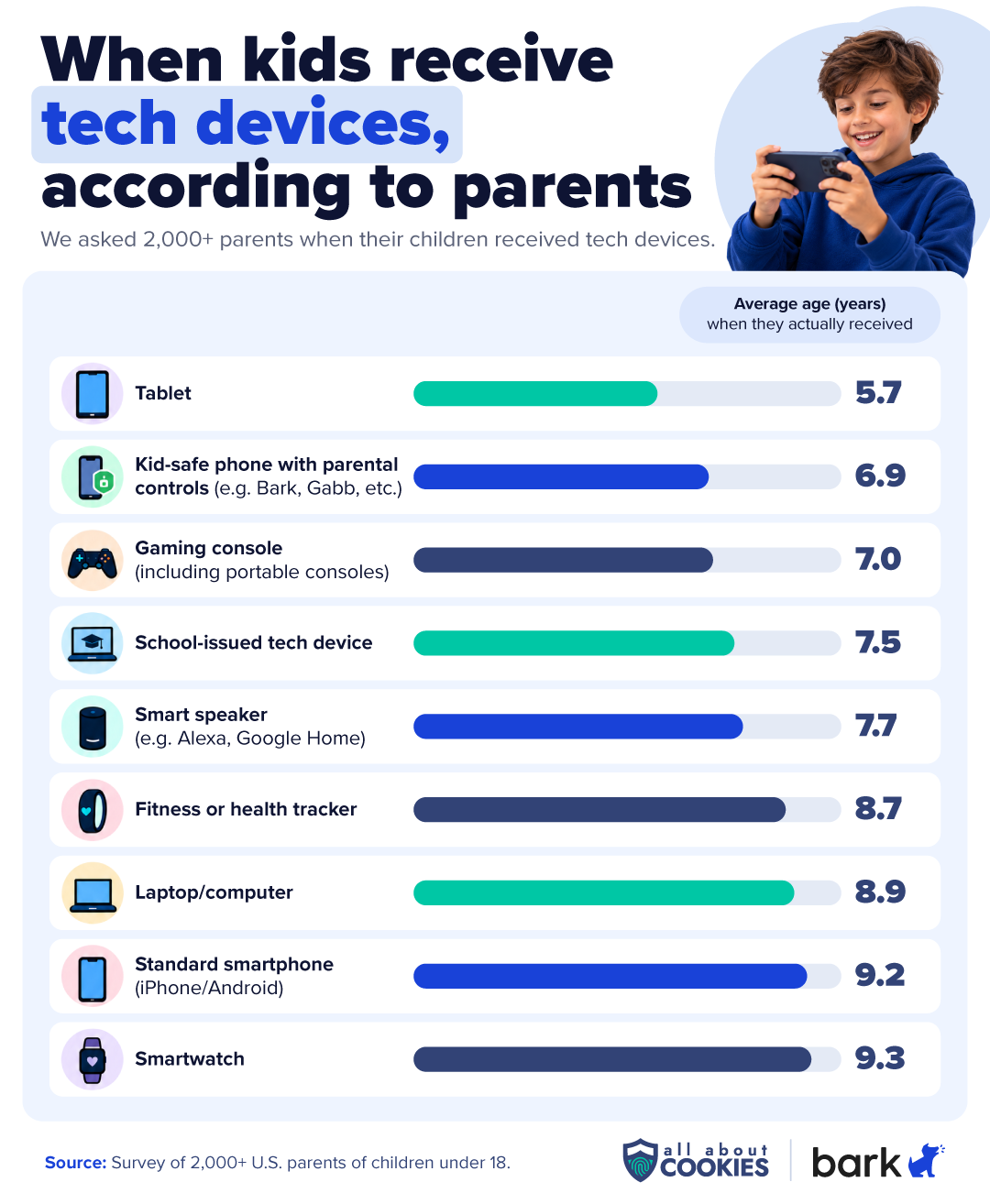
The right tech gift also depends on your child's age and readiness. Among kids who received these devices, tablets arrived earliest, at an average age of 5.7, followed by kid-safe phones at 6.9 and gaming consoles at 7.0. Standard smartphones and smartwatches tended to come later, around age 9.
Age isn't the only factor, though. Before buying a device, consider:
Built-in protections: Does it offer screen time limits, content restrictions, communication controls, and purchase approvals?
Messaging and social media: Which third-party platforms can your child access?
Room to grow: Can you adjust the settings as your child gets older?
Ongoing costs: Will subscriptions, games, or in-app purchases affect your monthly budget?
According to our survey, 81% of parents planning to buy tech gifts for their kids consider built-in parental controls important. Built-in parental controls are a useful starting point for managing screen time, app access, purchases, and supported content restrictions. But parents have doubts: 46% agree built-in controls aren’t strict enough, and 53% agree kids can easily get around them.
Apple Screen Time and Google Family Link offer useful protections for managing screen time, app access, and content restrictions. Apple also provides Communication Safety, which detects sensitive content in supported photos and videos, while Google Messages uses on-device detection to warn about nudity in images. However, neither provides comprehensive monitoring of conversations across third-party messaging and social media apps.
If your family needs more visibility or flexibility, dedicated parental control apps can help fill some of those gaps. Bark offers several options depending on the devices your child uses:
Bark parental controls analyzes supported messages, emails, and online activities for potential risks across 30+ alert categories, notifying parents when it detects something concerning. Read our Bark parental controls review to learn more about its monitoring features.
Bark Phone and Bark Watch are good fits if your child needs a way to stay connected but isn’t ready for unrestricted smartphone access. Bark Phone looks and feels like a regular Android smartphone, but its parental controls are built in rather than installed through a separate app. Similarly, Bark Watch has a familiar design, built on the Samsung Galaxy Watch8, but offers a more limited feature set for kids who aren't ready for a phone. Bark Phone automatically scans text messages, emails, web searches, and 30+ social media apps for signs of cyberbullying, depression, online predators, and self-harm, while Bark Watch focuses on calling, texting, and location sharing without typical smartphone apps or browsing. Both include built-in Bark parental controls, though their features differ.
Bark Home manages internet access across your home Wi-Fi. You can filter websites and online content across supported devices, set internet schedules and limits, and manage shared devices like gaming consoles, smart TVs, streaming sticks, and computers without installing an app on every screen. Not every family needs this level of control. For multi-child, multi-device homes, though, it makes life easier, especially for parents of younger kids who aren’t using their devices away from home yet.
4.7
AllAboutCookies writers and editors score products based on a number of objective features as well as our expert editorial assessment. Our partners do not influence how we rate products.
PROMOTION: Get $30 Off the Bark Phone or Watch with Code JOY30 thru Dec. 24
Parental controls app that monitors texts, email, and social media for signs of bullying, self-harm, depression, and predatory contact
Supports parental monitoring across smartphones, tablets, and computers, not just phones
Designed to be tamper-resistant, and parents are notified if the VPN is turned off or the app stops working
How parental controls should change as kids get older
Monitoring your child’s phone or other tech devices changes over time. Younger children may need more restrictive app access, communication settings, and screen time limits. As they mature, they may benefit more from collaborative rules, greater independence, and periodic reviews of existing settings.
Transparency also builds trust: 77% of parents who monitor their children's technology have told their children about it. Open communication fosters collaboration rather than a feeling of being spied on. And while there’s no one-size-fits-all formula, open dialogue and mutual trust should be the bedrock of any parental gadget oversight strategy. This makes it easier to give children greater autonomy as they get older. If you're considering additional supervision, our guide to the best parental control apps for teens can help you compare options.
Bottom line
Most parents buying tech gifts this holiday season say parental controls matter, but fewer than half plan to set them up before gifting. If you’re putting a device under the tree, make setup part of your holiday prep. Create a child account, update the device, enable age-appropriate controls, and test everything before you wrap it.
Choose a device with safety features that fit your child’s age. If built-in controls don’t cover everything your family needs, consider adding a monitoring tool like Bark. As your kid grows, revisit those settings together.
FAQs
What should parents look for when buying tech gifts for kids?
There are several things to consider, starting with whether the gadget is appropriate for their age. Parents should also examine the gifts’ built-in parental controls, communication features, privacy, and ongoing costs.
Should you set up parental controls before giving a child a new device?
Yes, you should. Each device has its own unique parental controls, and it takes time to figure them out. You might not understand how a feature works or notice a missing one. It’s better to realize it before your child accesses something they shouldn’t.
Do gaming consoles and smartwatches have parental controls?
Many gaming consoles and smartwatches offer parental controls, but features vary by manufacturer and model. In most cases, parents can adjust communication settings, toggle the ability to make purchases, and restrict playtime to designated time slots.
Are built-in parental controls enough to keep kids safe online?
Built-in parental controls can address many common concerns, but they don't eliminate every risk. Parents who find Apple and Android lacking in certain safeguards and want stronger control over their kids’ devices use third-party tools to fill the gaps.
4.7
AllAboutCookies writers and editors score products based on a number of objective features as well as our expert editorial assessment. Our partners do not influence how we rate products.
Kate Quinlan is a Senior Editor at All About Cookies, where she has tested dozens of digital security tools and contributed to 500+ articles on data security, web building & hosting, VPNs, ad blockers, parental controls, and more. Before joining AAC, she managed a team of more than 150 writers at SuperSummary, where she developed editorial standards at scale. She holds a B.A. in Professional Writing from Kutztown University.