Bark Phone Review 2026: Is It Worth the Cost?
I tested Bark Phone Pro's built-in parental controls, content monitoring, and GPS tracking to see whether Bark Phone is worth the cost.


Last updated Nov 24, 2026
All About Cookies is an independent, advertising-supported website. Some of the offers that appear on this site are from third-party advertisers from which All About Cookies receives compensation. This compensation may impact how and where products appear on this site (including, for example, the order in which they appear).
All About Cookies does not include all financial or credit offers that might be available to consumers nor do we include all companies or all available products. Information is accurate as of the publishing date and has not been provided or endorsed by the advertiser.
The All About Cookies editorial team strives to provide accurate, in-depth information and reviews to help you, our reader, make online privacy decisions with confidence. Here's what you can expect from us:


 Samsung Galaxy A16 or A37 with built-in parental controls for managing apps, contacts, screen time, and web access
Monitors texts and supported online activities for potential risks, including cyberbullying and predatory contact
Blocked apps stayed inaccessible in our testing, and restricted device settings required a parent code
All About Cookies is an independent, advertising-supported website. Some of the offers that appear on this site are from third-party advertisers from which All About Cookies receives compensation. This compensation may impact how and where products appear on this site (including, for example, the order in which they appear).
All About Cookies does not include all financial or credit offers that might be available to consumers nor do we include all companies or all available products. Information is accurate as of the publishing date and has not been provided or endorsed by the advertiser.
The All About Cookies editorial team strives to provide accurate, in-depth information and reviews to help you, our reader, make online privacy decisions with confidence. Here's what you can expect from us:
Bark Phone offers a middle ground between an unrestricted smartphone and a more limited kids' phone. I recently tested the Bark Phone Pro, and aside from the parental restrictions I enabled, it looked and felt like any other Android device.
Unlike parental monitoring apps installed on an existing phone, Bark Phone has parental controls integrated directly into the device. In my testing, content monitoring alerts arrived almost instantly, app and contact restrictions worked as intended, and attempts to access restricted device settings were unsuccessful. However, I found the parent dashboard could be better organized, and location alerts didn't work as expected.
Bark Phone is worth the cost for parents who prioritize tamper-resistant parental controls and want the flexibility to gradually introduce smartphone features as their children mature. The main trade-off is cost, as you'll need to purchase the phone and pay for ongoing wireless service. For families deciding when to give their child a phone, Bark Phone offers customizable restrictions that can evolve as children gain independence.
| Best for | Parents who want a traditional smartphone with built-in monitoring and customizable parental controls |
| Available models | Bark Phone (Samsung Galaxy A16), Bark Phone Pro (Samsung Galaxy A37) |
| Tested model | Bark Phone Pro (Samsung Galaxy A37) |
| Device price | $360 (Bark Phone), $600 (Bark Phone Pro) |
| Monthly service | $29–$79/mo, includes Bark Premium |
| Calling and texting | Unlimited, with parental contact approvals |
| App and web access | Available with Advanced plans, subject to parental restrictions |
| Content monitoring | Alerts for potentially concerning texts, social media activity, and other supported content, depending on plan and app access |
| Screen time management | Yes, with customizable schedules |
| GPS location tracking | Yes |
| Warranty/returns | 1-year limited warranty for defective devices |
| Money-back guarantee | 60 days on devices purchased directly from Bark |
| Details | Get Bark Phone |
Samsung Galaxy A16 or A37 with built-in parental controls for managing apps, contacts, screen time, and web access
Monitors texts and supported online activities for potential risks, including cyberbullying and predatory contact
Blocked apps stayed inaccessible in our testing, and restricted device settings required a parent code
We last tested Bark Phone on November 16, 2026.
I tested Bark Phone in November 2026 using the Bark Phone Pro, a modified Samsung Galaxy A37 with integrated parental controls.
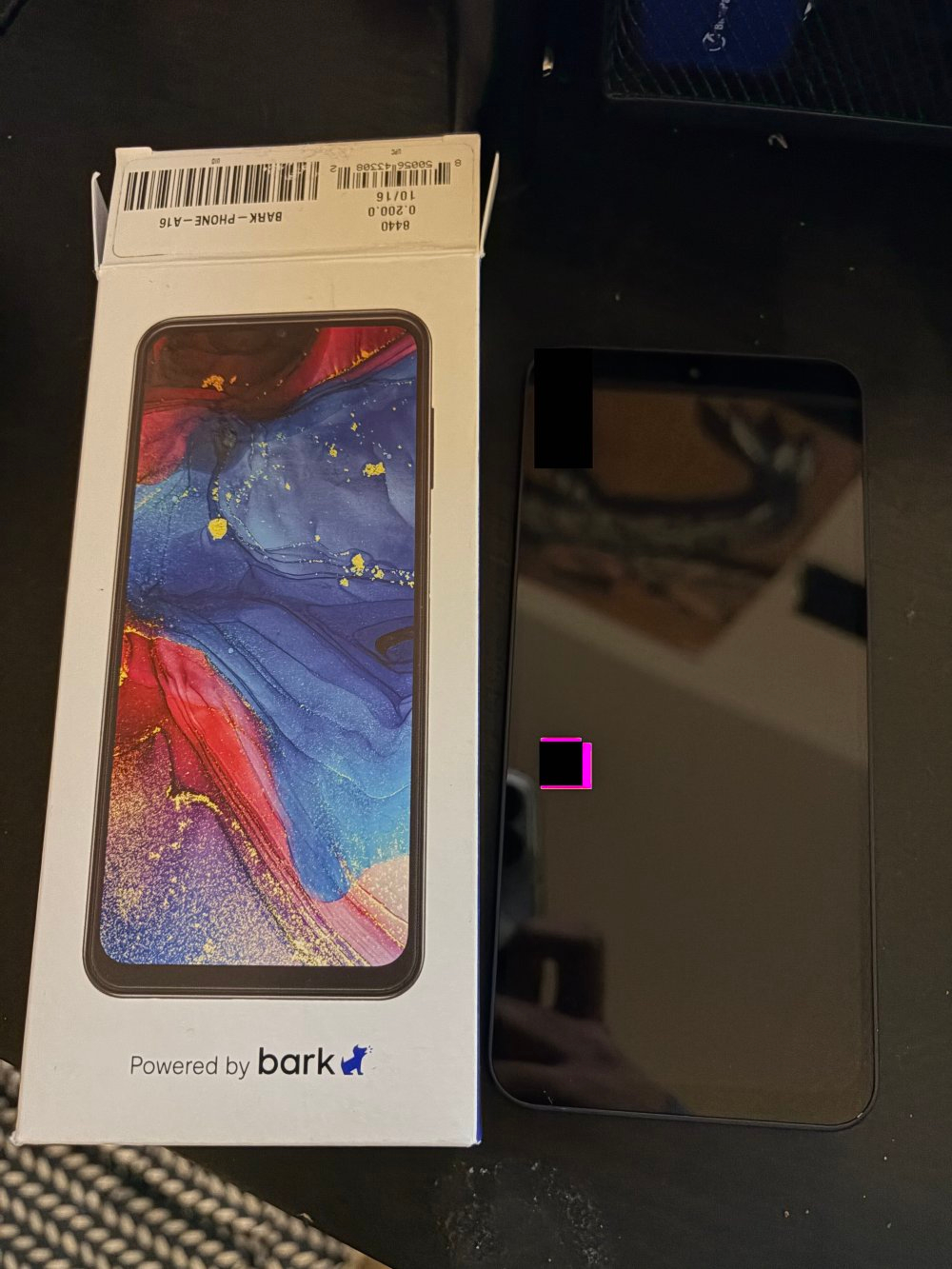
To evaluate its effectiveness, I configured Bark Phone's parental controls and tested the phone from both the parent and child perspectives. I assessed content monitoring and alert response times, contact approvals, screen time management, GPS location tracking, and app and website restrictions. I also attempted to access restricted device settings to see how well Bark Phone resisted attempts to bypass its parental controls.
I'd give my user experience with Bark Phone a five out of five. The parental controls worked well in my testing: the settings were highly customizable, and monitoring alerts arrived in the parent app almost immediately. I was also impressed by how quickly I could get the phone up and running.
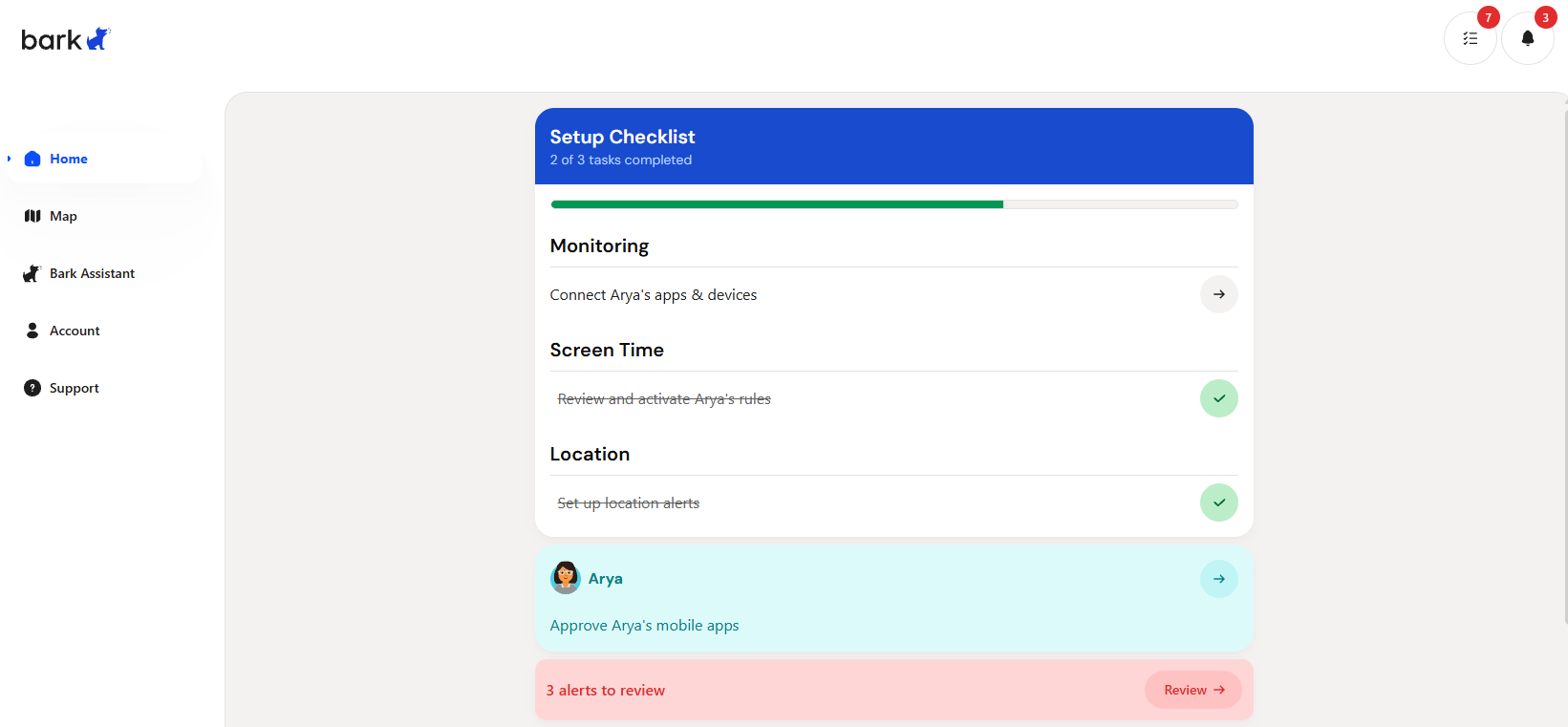
After turning on Bark Phone, I scanned a QR code using my parent device and selected the child profile I wanted to link it to. Then I customized several settings.
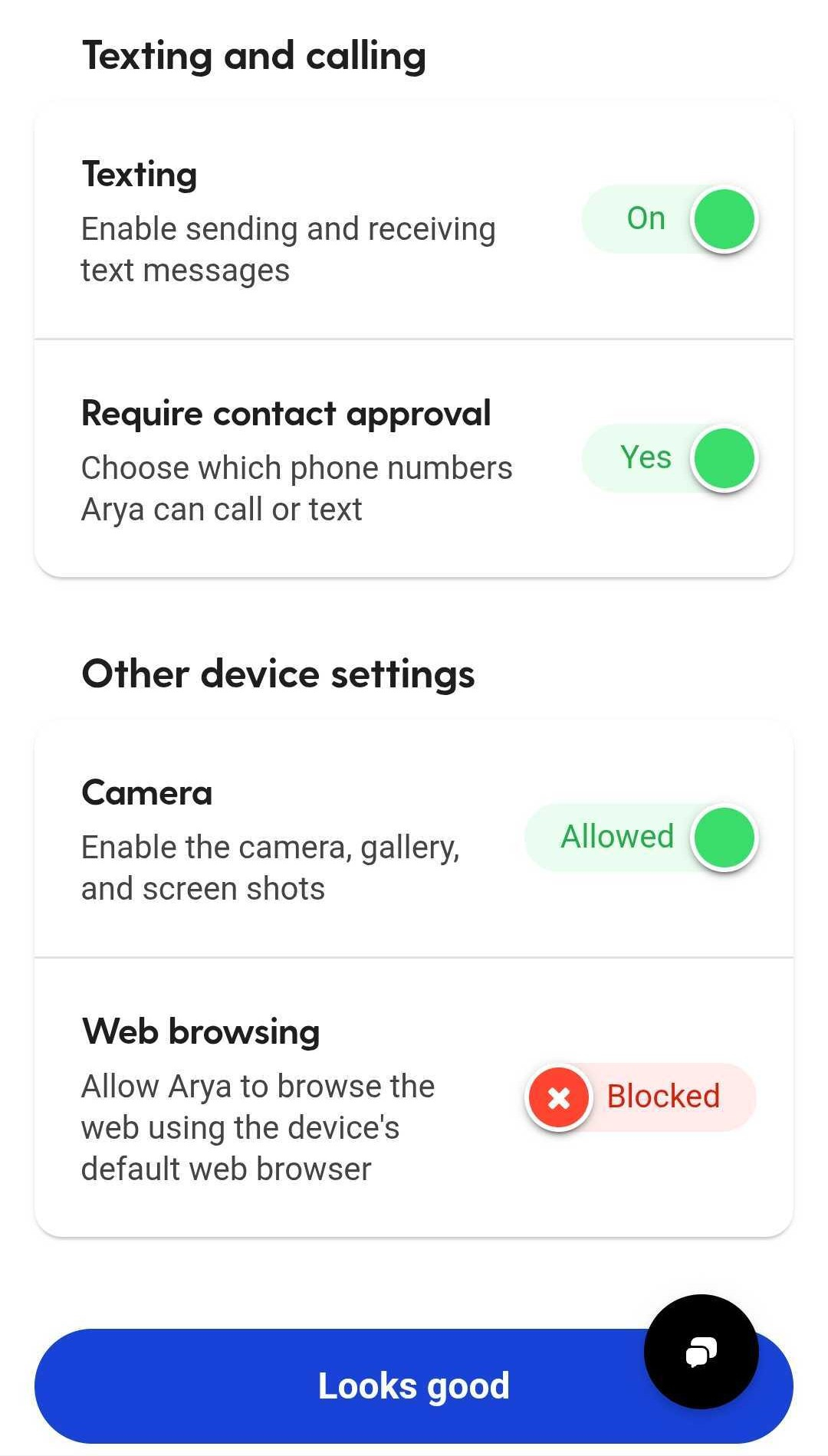
I enabled the following permissions:
I configured other actions to require my approval:
I also transferred my child's phone number to Bark Phone and confirmed how I wanted to receive monitoring alerts. The entire setup took less than 10 minutes.
One of my favorite aspects of Bark Phone is that it's a modified Samsung device, so it looks, feels, and functions like a regular smartphone. The restrictions I enabled worked as intended: Apps I blocked were grayed out and couldn't be opened, while everything else felt like any other Android device I've used.
In our 2026 Kids and Tech Study, we found that 54% of children ages 10–12 have their own smartphone. For tweens who want a phone like their peers, Bark Phone offers a familiar smartphone experience without parents losing oversight.
On the parental controls side, the Bark dashboard offers substantial customization, but I wish it were organized by feature, such as monitoring, screen time management, and location tracking. This would make it easier to navigate, especially for parents new to parental control software.
Bark Phone costs $360 for the Samsung Galaxy A16 model or $600 for the Samsung Galaxy A37 (Bark Phone Pro). You'll also need a Bark wireless plan, which costs $29–$79/mo.
Bark offers two subscription options: Starter and Advanced. Both include a Bark Premium subscription for the entire family, so you don't need to pay extra to monitor other supported devices your children already own. See our full Bark parental controls review for more on the app's features and how it performed in our testing.
Here's the breakdown:
| Feature | Starter | Advanced |
| Monthly price | $29/mo | $39/mo–$79/mo |
| Cellular data | None | 0 GB–unlimited |
| Unlimited calling and texting | ||
| Contact approvals | Always enabled | Yes, customizable |
| GPS location tracking | ||
| Content monitoring | ||
| Remote phone lock | ||
| Web browsing | ||
| App downloads and approvals | ||
| Social media access | ||
| App time limits | ||
| Website and category blocking | All web browsing blocked | Yes, customizable |
| Voicemail | ||
| Bark Premium subscription | Included | Included |
| Details | Get Bark Phone | Get Bark Phone |
Bark Phone's total first-year cost ranges from $708 to $1,548 before taxes and any additional fees. The low end reflects purchasing the $360 Samsung Galaxy A16 and pairing it with the $29/mo Starter plan. The high end comes from purchasing the $600 Bark Phone Pro and subscribing to the $79/mo Advanced plan.
However, you can pair either phone with any Bark wireless plan and upgrade from Starter to Advanced without purchasing a new device. This flexibility is particularly useful for parents who want to gradually introduce smartphone features as their children mature.
Bark also offers installment payments through Klarna and Affirm, subject to approval.
| Support type | Bark Phone |
| Yes — daily from 8 a.m. to midnight ET, but not to initiate support; only for follow-up | |
| Live chat | Yes — AI 24/7 with humans on request daily from 8:30 a.m. to 10 p.m. ET |
| Phone | Yes — calls are initiated from the Bark app and available daily from 9 a.m. to 10 p.m. ET |
| Online guides or forums | Yes — how-to videos and knowledge base articles |
Bark offers several support options, including how-to videos, written tutorials, live chat, phone support, and email follow-ups.
Additionally, you have 60 days to return Bark Phone for a refund if you bought it directly from Bark and it's in good condition. However, refunds only cover the cost of the device, not the monthly subscription.
If you receive a defective Bark Phone, you can request a replacement as long as you bought it directly from Bark and your request is within a year of your purchase date. The defect has to be genuine and not the result of an accident.
Bark Phone offers several ways to monitor your child's phone without installing a separate parental control app. I configured its built-in parental controls and tested how they responded on both the parent and child side.
The parent app lets you choose whether to receive all alerts or just severe ones. I left it on all alerts and sent some bullying texts, which triggered a near-instant notification in the parent app. An email arrived shortly after.
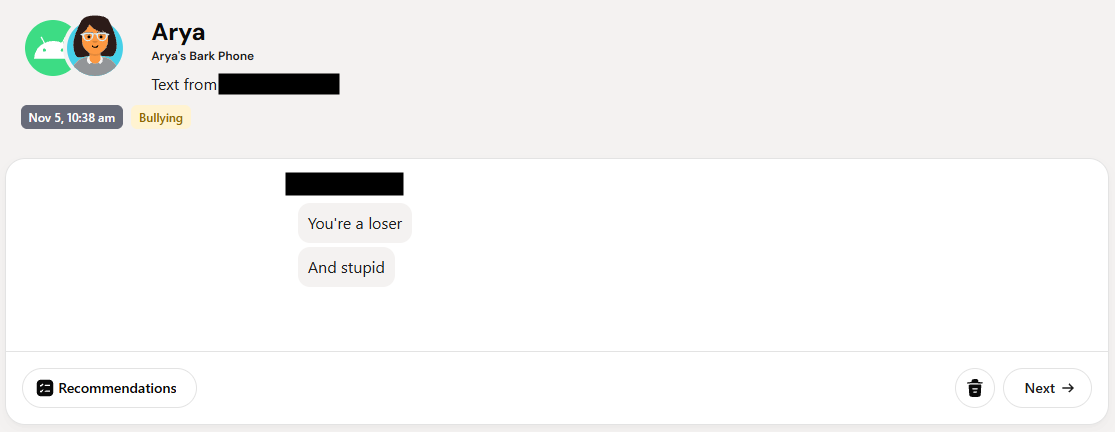
I also noticed that Bark respects the child's privacy because it didn't share my warm-up texts. It only sent the specific snippet that contained the bullying, and does the same for self-harm and predatory behavior.
Next, I used the web browser to navigate to onlyfans.com, but it wouldn't load. I also searched for "weed" and "cyberbullying." All three actions generated alerts, and the weekly report gave guidance on how to broach the subject with your child.
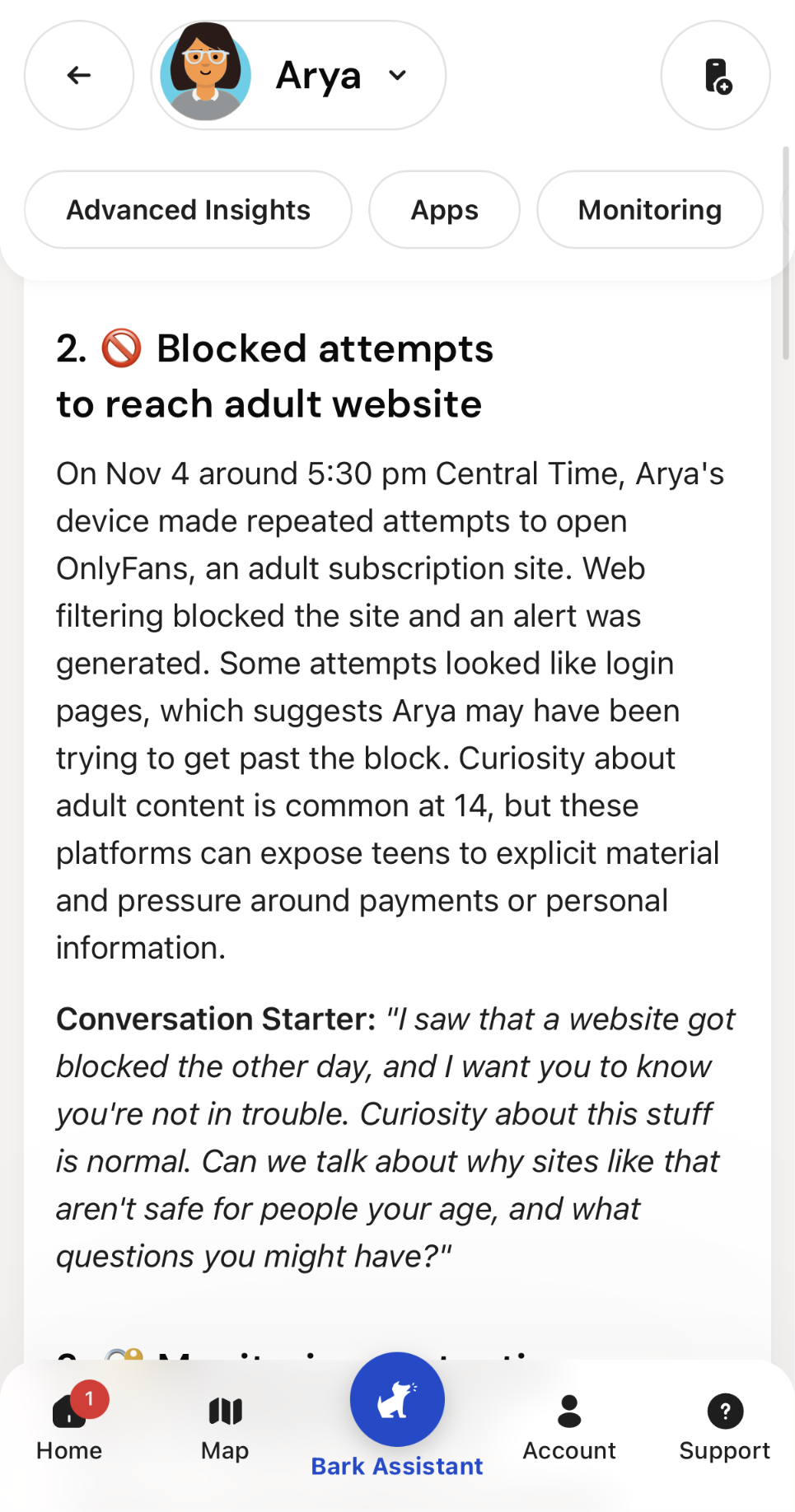
These conversations are an important part of protecting your kids online, and I appreciated that Bark provided guidance rather than simply flagging concerning activity.
To test app restrictions and screen time management, I started by downloading and installing Instagram. The installation attempt was instantly flagged, and a notification was sent to the parent dashboard to approve the app and configure its settings:
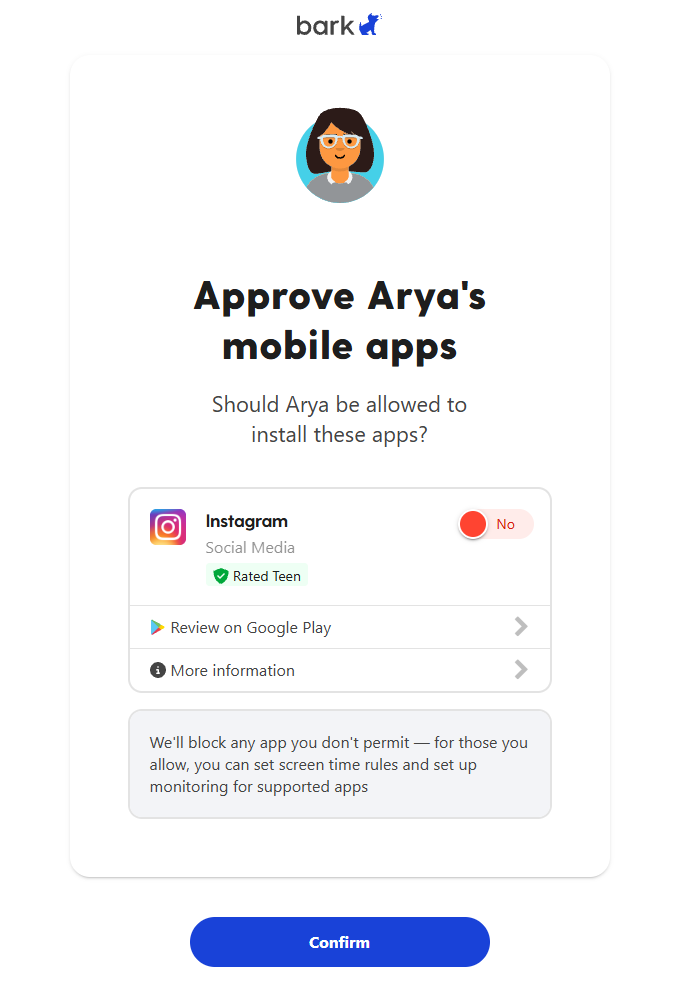
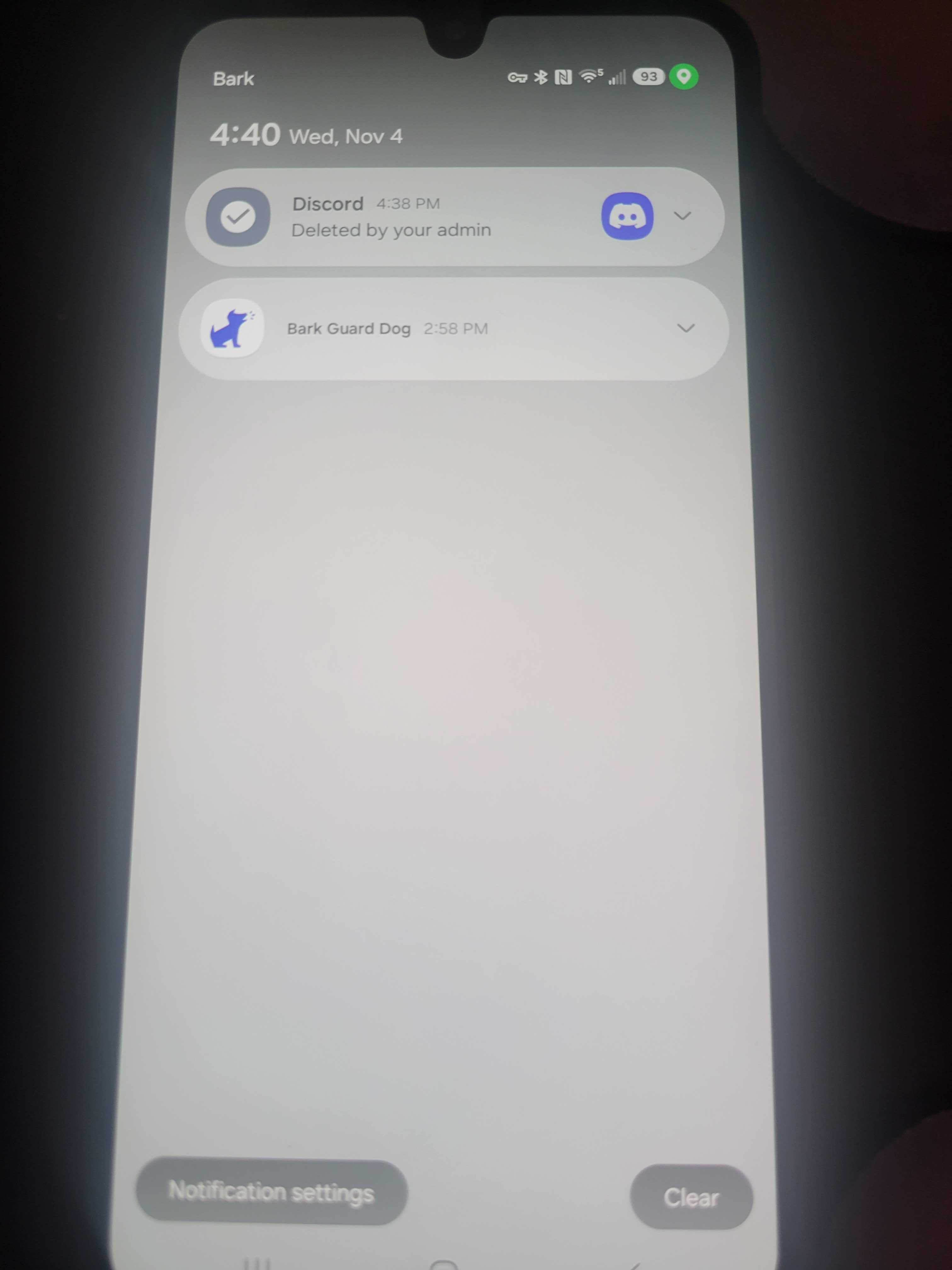
I didn't approve it, and it appeared grayed out on the Bark Phone. Tapping it did nothing. Afterward, I removed Discord and instantly received a notification on the child's side that it had been deleted:
I checked a few other apps to ensure I could configure their restrictions and, in the process, took a deeper dive into screen time schedules. Bark lets you apply these in 15-minute increments to individual apps, categories, or even the entire phone. I was able to organize them into repeating time blocks like bedtime, school, and free time:
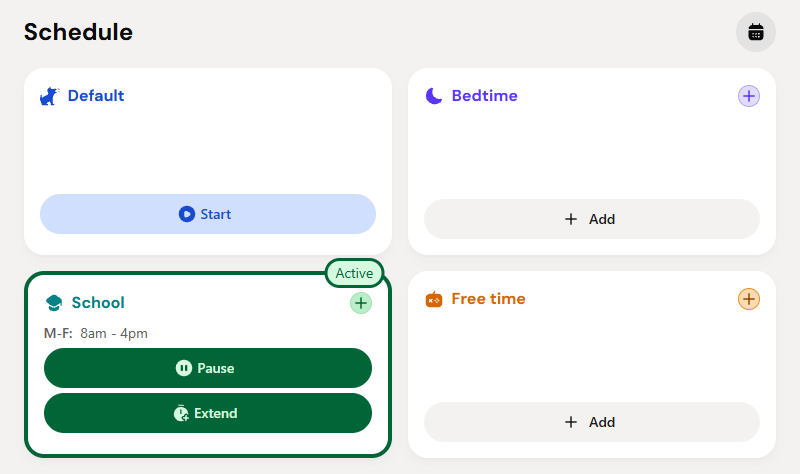
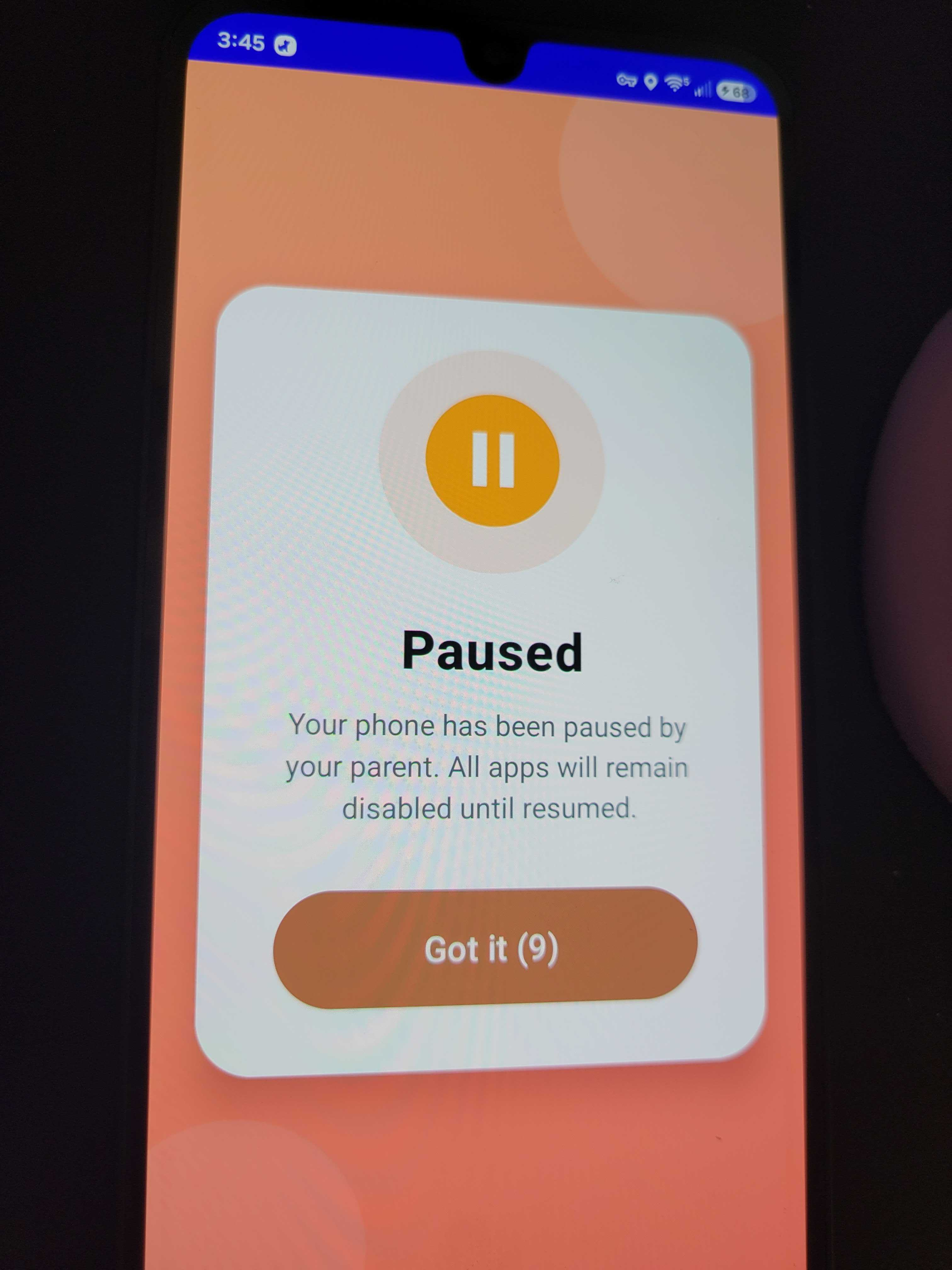
I could also extend or pause screen time sessions from the parent dashboard. When I paused a session, a 10-second countdown appeared on Bark Phone before access was restricted.
Next, I wanted to see how Bark Phone would handle phone calls, so I called it from an unapproved number. It went straight to voicemail, and a contact approval request appeared in the parent dashboard:
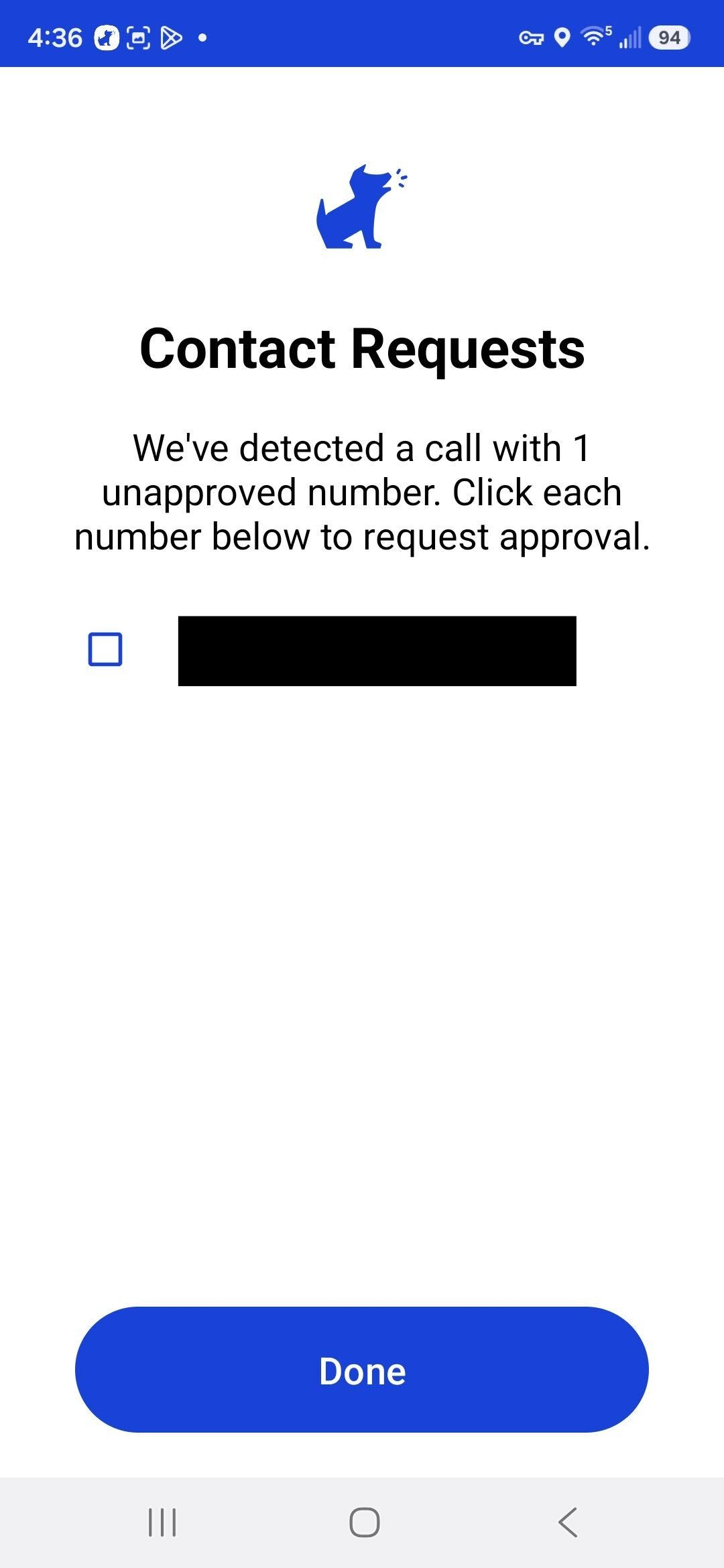
This feature makes the Bark Phone a great candidate for a child's first smartphone because it makes it easy for parents to protect their kids from unwanted communication.
Following the phone call, I checked how well Bark Phone tracks its own location. On the plus side, the Bark map matched my location on Google Maps and refreshed every time I opened it.

I also added my address to a list of favorite locations and turned on alerts for when the phone arrived at or left any of them. However, when I walked around my neighborhood, about a mile away, I never received a location alert. I couldn't determine why the alert didn't trigger during testing.
We asked parents how they felt about default parental control apps they've used, like Apple Screen Time and Google Family Link: 53% agreed that built-in parental controls are too easy for kids to get around. That's a valid concern, and I wanted to check it for parents considering the Bark Phone.
I'm happy to report that I couldn't circumvent them. When I tried to access reset-related settings, I was met with a restricted-settings screen requiring a device code to proceed:
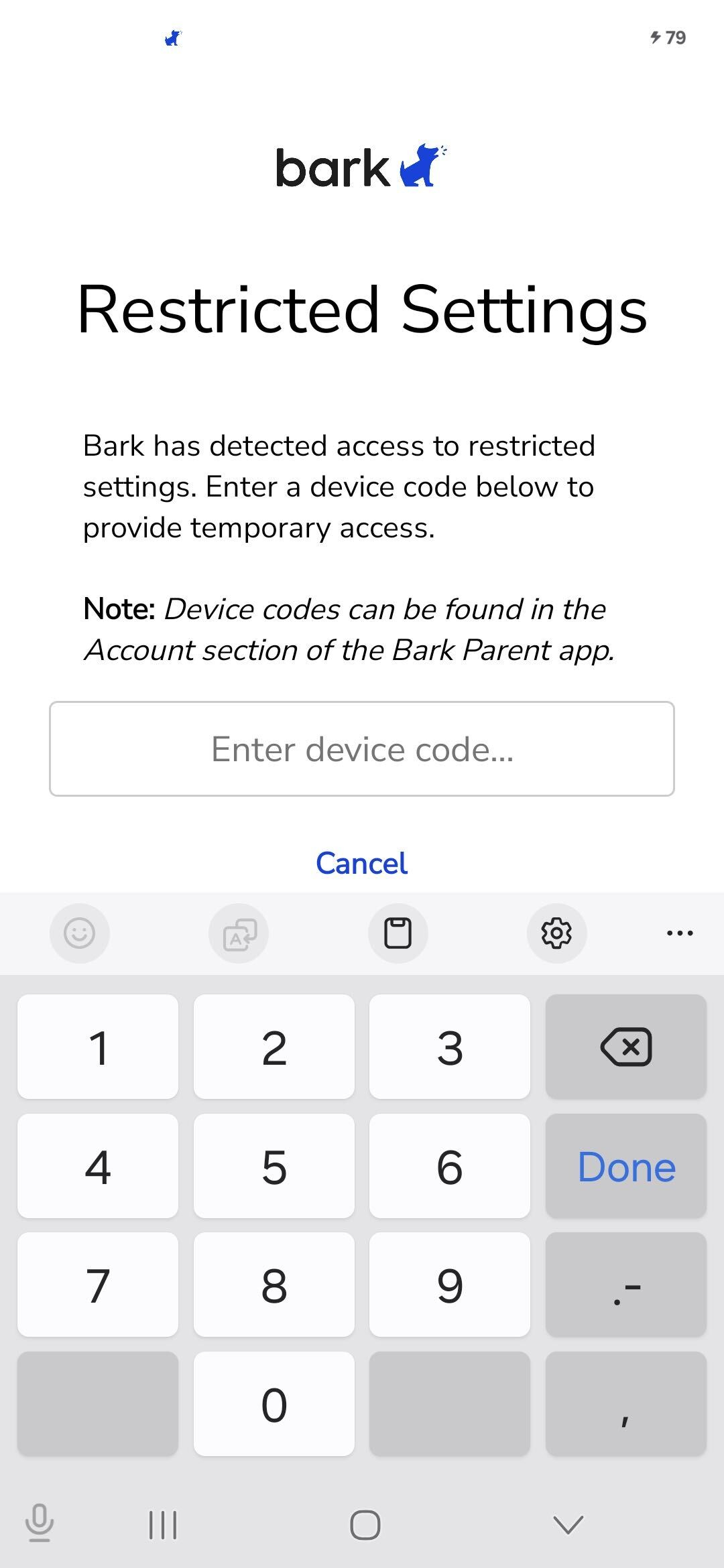
Bark Phone's built-in device restrictions are a significant advantage over standalone parental control apps. While no device is guaranteed to be immune to tampering, I couldn't access the restricted settings needed to reset the phone without parental authorization.
 Parental controls app that monitors texts, email, and social media for signs of bullying, self-harm, depression, and predatory contact
Supports parental monitoring across smartphones, tablets, and computers, not just phones
Designed to be tamper-resistant, and parents are notified if the VPN is turned off or the app stops working
Both Bark Phone and Bark Phone Pro are modified Samsung smartphones with the same built-in parental controls. They share several hardware specifications, but the Pro model offers faster processing, more memory, and enhanced durability.
| Specification | Bark Phone | Bark Phone Pro |
| Model | Samsung Galaxy A16 | Samsung Galaxy A37 |
| Device price | $360 | $600 |
| Operating system | Android with integrated Bark parental controls | Android with integrated Bark parental controls |
| Display size | 6.7 inches | 6.7 inches |
| Storage | 128 GB | 128 GB |
| RAM | 4 GB | 6 GB |
| Processor | Snapdragon 6 Gen 3 processor | Octa-core processor |
| Battery capacity | 5,000 mAh | 5,000 mAh |
| Fast charging | 25W | 45W |
| Rear camera | 50 MP triple-lens camera system | 50 MP triple-lens camera system |
| Details | Get Bark Phone | Get Bark Phone Pro |
The main reasons to spend an additional $240 on Bark Phone Pro are improved durability and performance, not additional parental control functionality. The stronger screen glass and higher water-resistance rating may appeal to parents of active kids, while the extra RAM and faster processor may benefit older kids who use more demanding apps and games.
When using Bark Phone Pro, I found the battery drained at a normal rate, but I also didn't use it in the way a child might. My testing consisted of one long session with a few quick check-ins rather than multiple sessions throughout the day, so I can't speak to its battery life under typical daily use. Overall, I had a positive experience with the device.
We found that 47% of parents want to monitor (or monitor more closely) their child's phone but currently can't (or can't easily). In addition, 26% said that their kid had either gotten around parental controls or they suspected it.
Bark Phone addresses both concerns, but it doesn't need to be the go-to for every family. Alternatives like Bark Watch might be better for younger kids who primarily need location tracking and a way to communicate with parents or other caregivers.
Samsung Galaxy Watch8 offering calling and texting with parent-approved contacts, but without games, social media, or web browsing
Built-in GPS location tracking, with an emergency SOS calling feature
Monitors texts, photos, and videos for potential risks, including bullying and predatory contact
If you're unsure how much smartphone functionality your child needs, our guide to choosing between a kids' phone, GPS watch, and parental monitoring app breaks down the benefits and limitations of each option.
Parents of older teens who already own a smartphone might prefer the Bark app. Although it's less tamper-resistant than Bark Phone because it has to work within the device's operating system, it's a more economical option for families who don't need a new phone. You can also compare other monitoring solutions in our guide to the best parental control apps.
Finally, Gabb Phone is an alternative for parents who prefer a more restrictive smartphone at a lower cost. It blocks access to web browsers, games, social media, and the app store by default, whereas Bark Phone gives parents more flexibility to introduce these features as their children mature.
Bark Phone is worth considering for parents who want their child to have a traditional smartphone with comprehensive, tamper-resistant parental controls built in. In my testing, monitoring alerts arrived almost instantly, app and contact restrictions worked as intended, and I couldn't access restricted device settings without parental authorization.
Although GPS tracking was accurate, I was disappointed that the location alert didn't trigger during my testing. The upfront device cost and ongoing wireless subscription are also worth weighing against the parental controls your family actually needs.
If your child already owns a smartphone and you're on a tighter budget, the Bark app may be a more economical way to supplement Apple Screen Time or Google Family Link.
Bark Phone wireless plans cost $29–$79/mo, depending on the features and cellular data allowance you choose. The phone itself costs $360 or $600, depending on the model. Financing is available through Affirm or Klarna, subject to approval.
All Bark Phone plans include unlimited talk and text, but the Starter plan doesn't allow access to web browsing, apps, games, social media, or voicemail. Advanced plans allow parents to customize access to these features.
Bark Phone is designed to resist attempts to bypass parental controls because its restrictions are built into the device. When I attempted to access the phone's reset settings, I was prompted to enter a code available in the parent app.
Bark Phone has more parental controls and is more tamper-resistant because the controls are built into the phone's operating system. In contrast, the Bark app is installed on top of an existing phone's operating system and has to work within its limitations.
Samsung Galaxy A16 or A37 with built-in parental controls for managing apps, contacts, screen time, and web access
Monitors texts and supported online activities for potential risks, including cyberbullying and predatory contact
Blocked apps stayed inaccessible in our testing, and restricted device settings required a parent code