We receive compensation from the products and services mentioned in
this story, but the opinions are the
author's own. Compensation may impact where offers appear. We have not included all available products or offers.
Learn more about
how we make money
and
our editorial policies.
Advertiser Disclosure
All About Cookies is an independent, advertising-supported website. Some of the offers that appear on this
site are from third-party advertisers from which All About Cookies receives compensation. This compensation
may impact how and where products appear on this site (including, for example, the order in which they
appear).
All About Cookies does not include all financial or credit offers that might be available to consumers nor
do
we include all companies or all available products. Information is accurate as of the publishing date and
has
not been provided or endorsed by the advertiser.
Close
Editorial Policy
The All About Cookies editorial team strives to provide accurate, in-depth information and reviews to help
you, our reader, make online privacy decisions with confidence. Here's what you can expect from us:
All About Cookies makes money when you click the links on our site to some of the products and offers that
we mention. These partnerships do not influence our opinions or recommendations. Read more about how we
make money.
Partners are not able to review or request changes to our content except for compliance reasons.
We aim to make sure everything on our site is up-to-date and accurate as of the publishing date, but we
cannot guarantee we haven't missed something. It's your responsibility to double-check all information
before making any decision. If you spot something that looks wrong, please let us know.
PROMOTION: Get $30 Off the Bark Phone or Watch with Code JOY30 thru Dec. 24
Samsung Galaxy Watch8 offering calling and texting with parent-approved contacts, but without games, social media, or web browsing
Built-in GPS location tracking, with an emergency SOS calling feature
Monitors texts, photos, and videos for potential risks, including bullying and predatory contact
Overview
Bark Watch is designed for kids who need to stay connected without a smartphone. It combines calling, texting, and GPS tracking with built-in parental controls, including contact approvals and alerts for concerning messages. In our testing, location tracking was accurate, and messages from unapproved contacts required approval. The watch doesn't support web browsing, games, or social media, making it a good option for families introducing basic communication.
We receive compensation from the products and services mentioned in
this story, but the opinions are the
author's own. Compensation may impact where offers appear. We have not included all available products or offers.
Learn more about
how we make money
and
our editorial policies.
Advertiser Disclosure
All About Cookies is an independent, advertising-supported website. Some of the offers that appear on this
site are from third-party advertisers from which All About Cookies receives compensation. This compensation
may impact how and where products appear on this site (including, for example, the order in which they
appear).
All About Cookies does not include all financial or credit offers that might be available to consumers nor
do
we include all companies or all available products. Information is accurate as of the publishing date and
has
not been provided or endorsed by the advertiser.
Close
Editorial Policy
The All About Cookies editorial team strives to provide accurate, in-depth information and reviews to help
you, our reader, make online privacy decisions with confidence. Here's what you can expect from us:
All About Cookies makes money when you click the links on our site to some of the products and offers that
we mention. These partnerships do not influence our opinions or recommendations. Read more about how we
make money.
Partners are not able to review or request changes to our content except for compliance reasons.
We aim to make sure everything on our site is up-to-date and accurate as of the publishing date, but we
cannot guarantee we haven't missed something. It's your responsibility to double-check all information
before making any decision. If you spot something that looks wrong, please let us know.
Close
Bark Watch is a kids' smartwatch designed for younger children who aren't ready for a smartphone. It offers calling, texting, GPS location tracking, and built-in parental controls without giving children access to web browsing, games, or social media.
I recently tested the Samsung Galaxy Watch8 version of Bark Watch. In my testing, GPS tracking was accurate, message monitoring alerts arrived almost instantly, and contact restrictions worked as intended. However, I was disappointed that the Samsung model doesn't support automatic alerts when children arrive at or leave designated locations.
Bark Watch is worth considering for parents who want a way to communicate with their children, check their location, and monitor potentially concerning messages without introducing a smartphone. You'll need to purchase the watch and pay for ongoing wireless service, but the plan also includes a Bark Premium subscription for the entire family.
Pros
Calling and texting with parent-managed contacts
Accurate GPS location tracking in testing
Prompt message monitoring alerts in testing
Notifications when the watch is powered on or off
Cons
Tested Samsung model lacks Favorite Location alerts
Upfront device cost plus ongoing wireless service
Monthly wireless service costs more than some competing kids' watches
PROMOTION: Get $30 Off the Bark Phone or Watch with Code JOY30 thru Dec. 24
Samsung Galaxy Watch8 offering calling and texting with parent-approved contacts, but without games, social media, or web browsing
Built-in GPS location tracking, with an emergency SOS calling feature
Monitors texts, photos, and videos for potential risks, including bullying and predatory contact
We last tested Bark Watch on November 12, 2026.
How I tested Bark Watch
I tested Bark Watch in November 2026 using the Samsung Galaxy Watch8 model with integrated Bark parental controls.
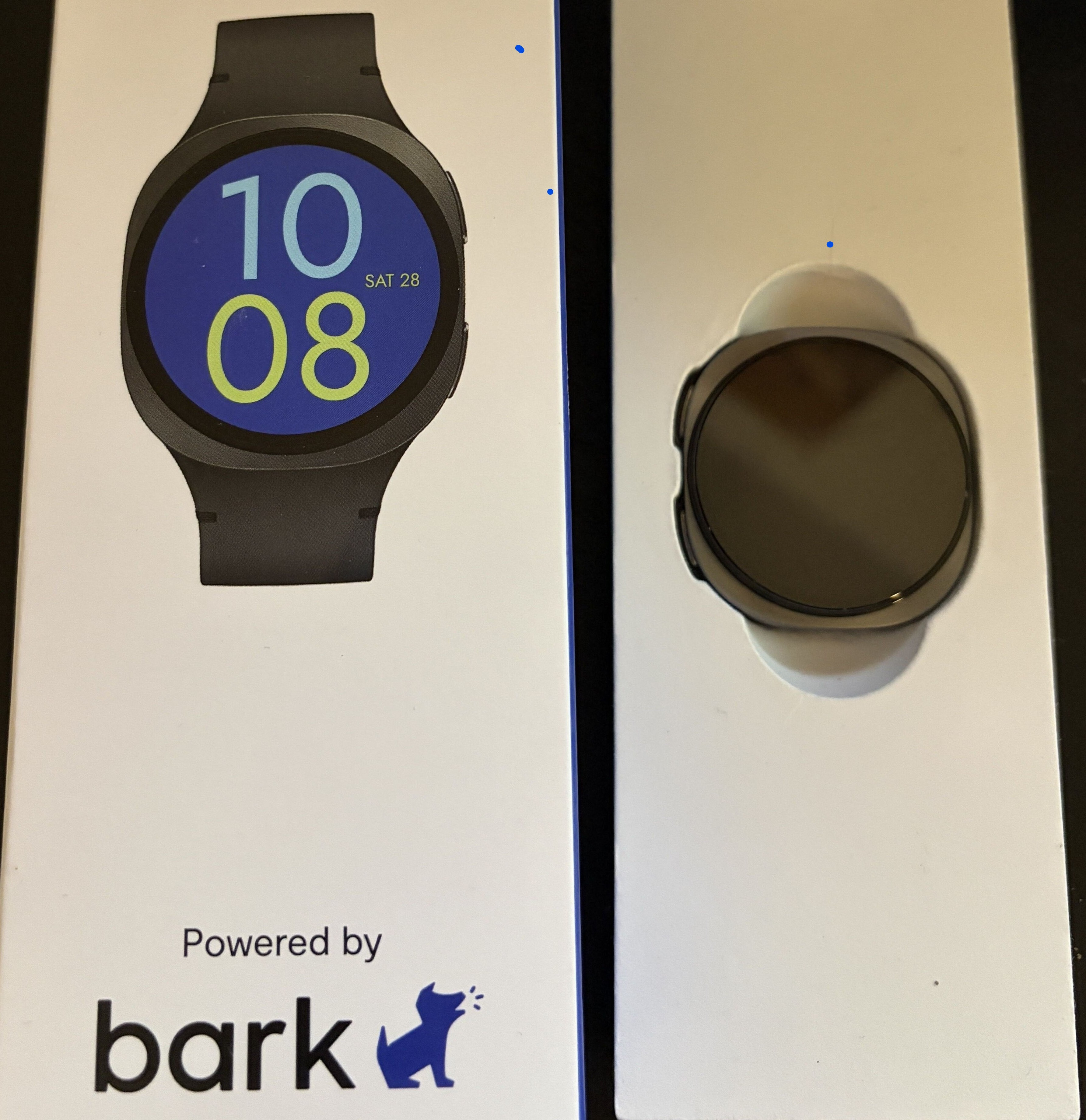
Unboxing Bark Watch Samsung Galaxy Watch8 for All About Cookies testing
I set up Bark Watch by connecting it to the parent app first. Then I configured communication permissions and tested how the watch handled approved and unapproved contacts. I also placed a phone call from the watch to check call quality on both my end and the receiving end. Afterward, I tested message monitoring, GPS location tracking, scheduling controls, and what happens when the watch is powered off.
My experience using Bark Watch
Setting up Bark Watch wasn't difficult, and the whole process took about 15 minutes, including waiting for the watch to restart. Although it took me some time to get accustomed to navigating the watch, I found its communication features straightforward to use.
Setup and activation
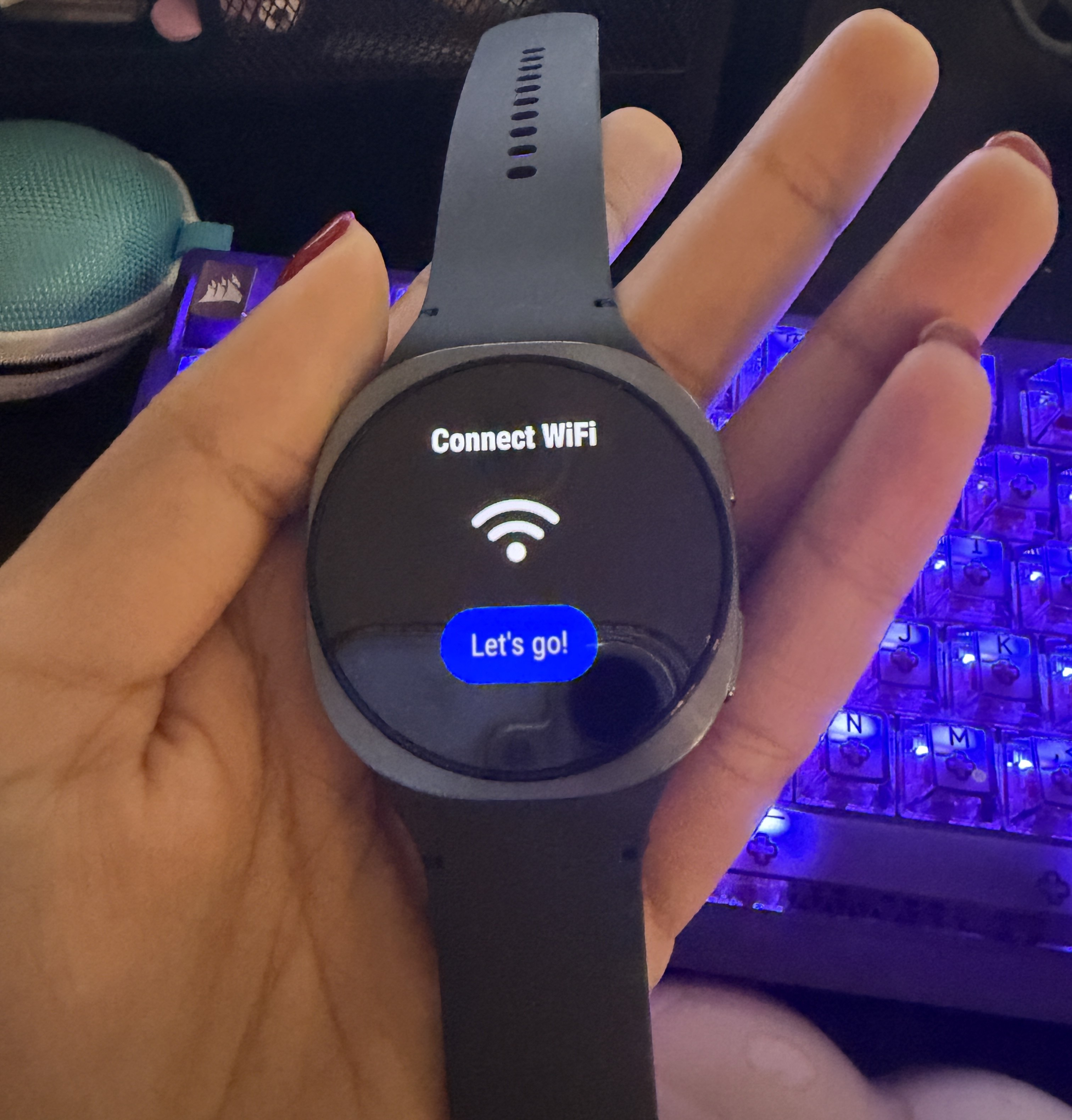
To get things going, I turned on Bark Watch and connected it to Wi-Fi.
Connecting Bark Watch to Wi-Fi for All About Cookies testing
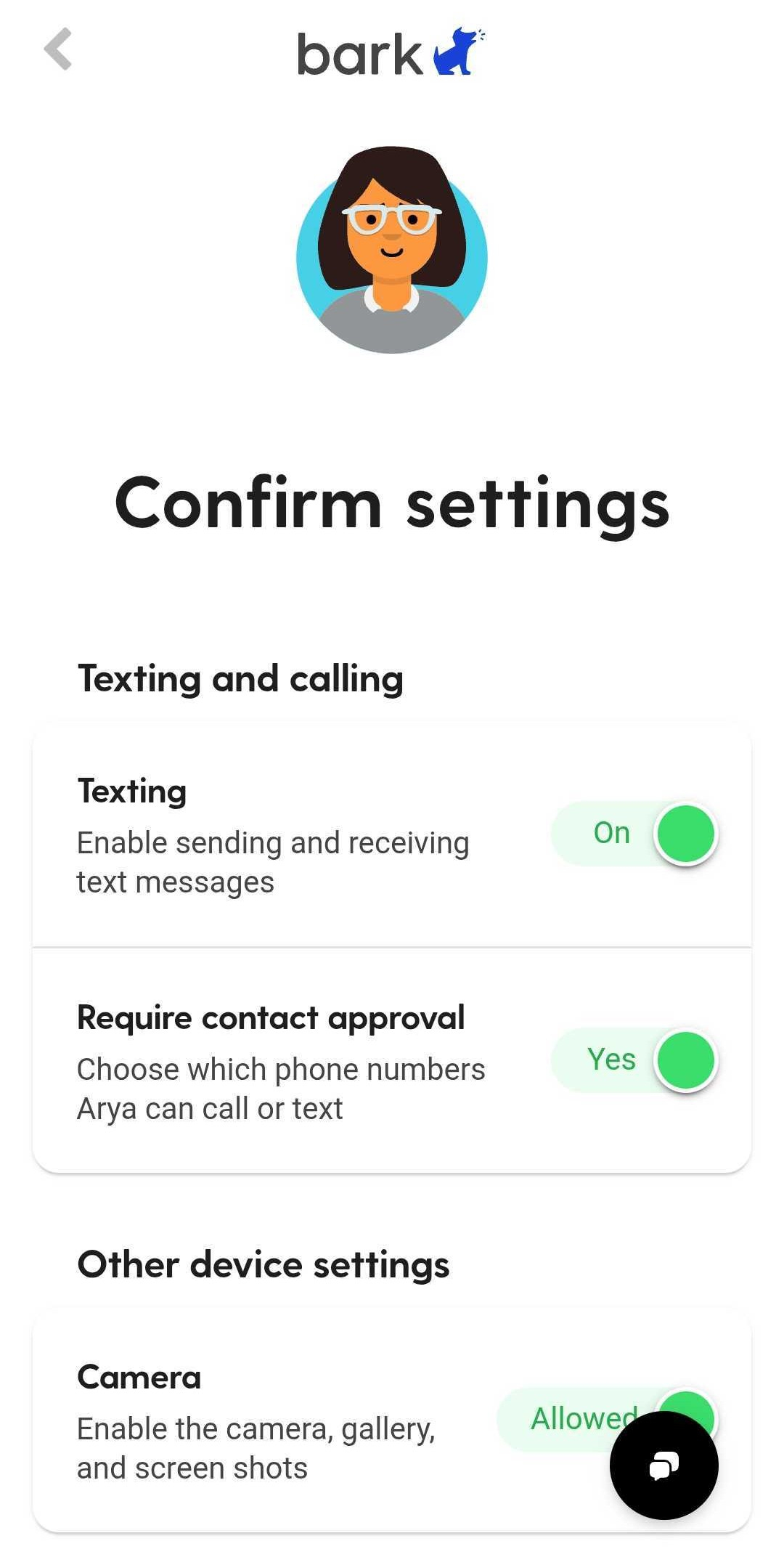
Then I used my phone to scan a QR code that appeared on the watch interface. That connected it to the Bark parent app, and from there, I confirmed settings related to texting, calling, and camera usage:
Bark Watch setup and communication permissions in the parent app
After configuring these settings, I had to restart Bark Watch. Within a few minutes, the watch was ready to use.
Everyday usability
Testing Bark Watch was my first time using a smartwatch, and it took me a bit to figure out which swipe direction took me to which screens. If you're in the same boat as me and want a head start, Bark has a guide that walks you through it.
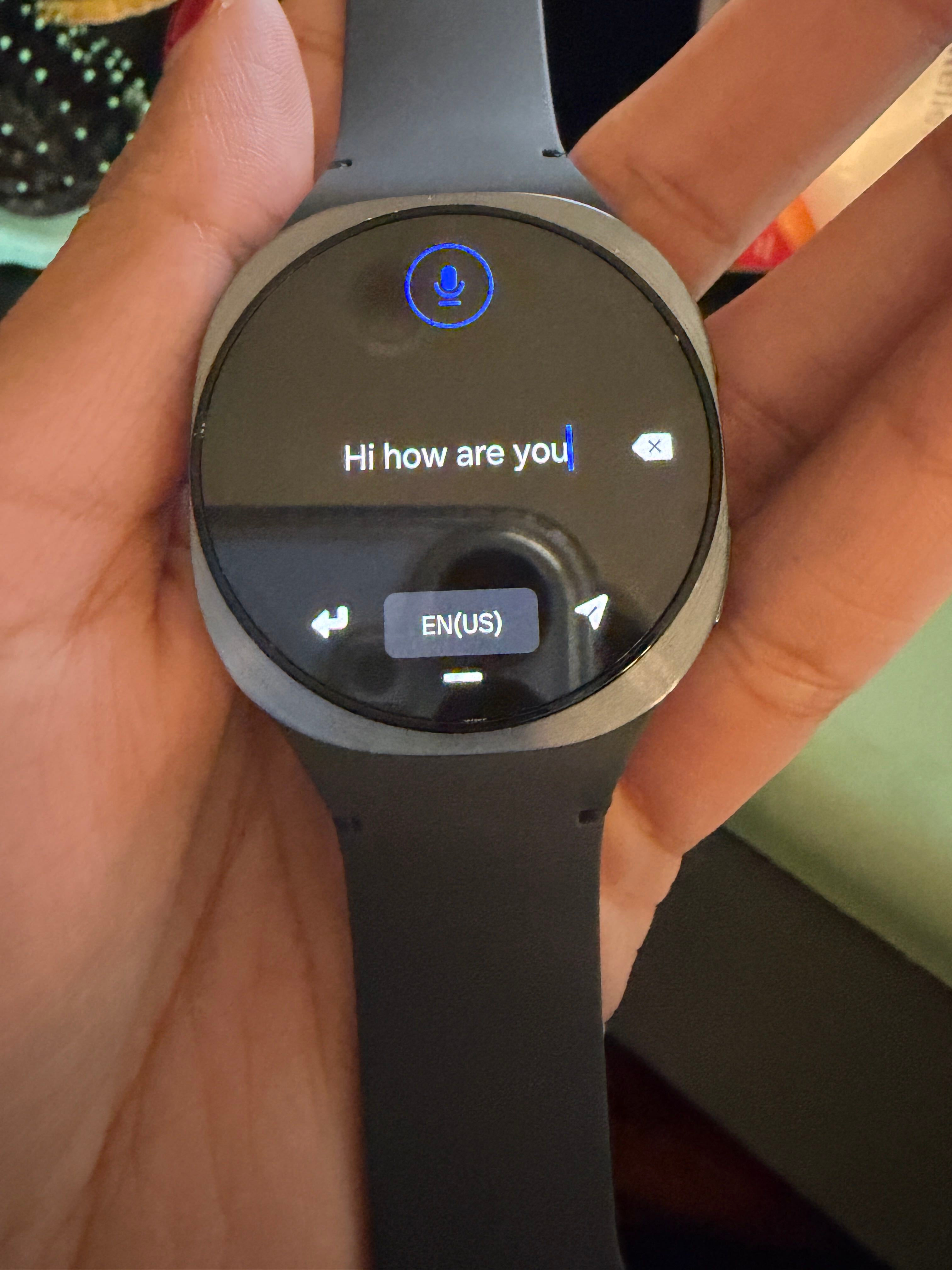
Typing was challenging because the screen was fairly small. Fortunately, Bark Watch has voice-to-text and quick-reply presets for fast responses, which may be particularly useful for younger kids who aren't comfortable typing yet.
Testing Bark Watch voice-to-text feature for All About Cookies
How much does Bark Watch cost?
Bark Watch pricing is straightforward and consists of two parts: a Samsung Galaxy Watch8 that costs $288 and a required monthly wireless service that costs $15/mo.
Although Bark Watch doesn't offer access to the web, social media, or games, its wireless service includes a Bark Premium subscription, which on its own costs $14/mo. This adds value for families with children of different ages because parents can also use the app to monitor their older children's supported devices at no additional subscription cost.
AllAboutCookies writers and editors score products based on a number of objective features as well as our expert editorial assessment. Our partners do not influence how we rate products.
2026 Editors’ Choice
Best Parental Control App for Message Monitoring
Parental Controls
Bark Premium
Parental controls app that monitors texts, email, and social media for signs of bullying, self-harm, depression, and predatory contact
Supports parental monitoring across smartphones, tablets, and computers, not just phones
Designed to be tamper-resistant, and parents are notified if the VPN is turned off or the app stops working
Aside from its baseline costs, Bark Watch has two optional items that can raise the total price:
Custom-color wristband: Bark Watch includes a black wristband by default, but you can choose an additional band in a different color for $9, raising the upfront cost to $297.
Device protection plan: For $4/mo, you can add protection for your Bark Watch against cracked screens, water damage, loss, and other problems. This raises the monthly cost to $19.
Bark Watch cost breakdown
Expense
Cost
Notes
Watch purchase
$288
Samsung Galaxy Watch8
Monthly wireless service
$15/mo
Required
Additional wristband
$9
Optional
Device protection
$4/mo
Optional; covers cracked screens, water damage, loss, and more
Bark Premium subscription
Included
Regular price is $14/mo
Estimated first-year total
$468
Device purchase plus 12 months of wireless service
Bark Watch's total first-year cost is $468 before taxes and any additional fees. This includes the upfront device purchase and 12 months of wireless service, without optional device protection or accessories.
Bark also offers installment payments through Klarna and Affirm, subject to approval.
Bark Watch customer support and warranty
Support type
Bark Watch
Email
Yes — daily from 8 a.m. to midnight ET, but not to initiate support; only for follow-up
Live chat
Yes — AI 24/7 with humans on request daily from 8:30 a.m. to 10 p.m. ET
Phone
Yes — calls are initiated from the Bark app and available daily from 9 a.m. to 10 p.m. ET
Online guides or forums
Yes — how-to videos and knowledge base articles
If you get stuck while using Bark Watch, you can watch how-to videos, read explainer articles, call support, or reach out via live chat.
If you're not satisfied, you can return Bark Watch for a refund within 60 days, as long as you bought it directly from Bark and it's in good condition. However, refunds only cover the cost of the device, not the monthly subscription.
Bark also has a replacement warranty that covers defective watches. It's valid if you buy directly from the company, your request is made within a year of your purchase date, and the defect isn't the result of accidental damage.
Testing Bark Watch features
Bark Watch combines communication features with built-in parental controls, allowing parents to manage who their children communicate with, monitor potentially concerning messages, and check their location. I tested these features from both the parent and child perspectives.
Calling, texting, and approved contacts
To test how Bark Watch handles calls, I made one straight from the watch. The call quality wasn't as crisp as on a phone, but I could hear the other person and adjust the volume to make it louder. After exchanging a few words, I switched to speakerphone, which improved the sound quality. The person on the other end said he could hear me fine and agreed with my assessment.
For texting, I began by adding a number to the watch's approved contacts list inside the parent app. Then I initiated a conversation from the approved number and used both the quick-reply presets and manual typing to respond from the watch.
When I tried to replicate the process from an unapproved number, the message didn't go through, and I received a notification on the parent dashboard. Parents who want their child to be able to communicate with anyone can turn off the approved contacts feature.
Testing Bark Watch testing restrictions for All About Cookies
Bark Watch also has a voice-to-text option, which I personally enjoyed more than typing messages.
Message monitoring and alerts
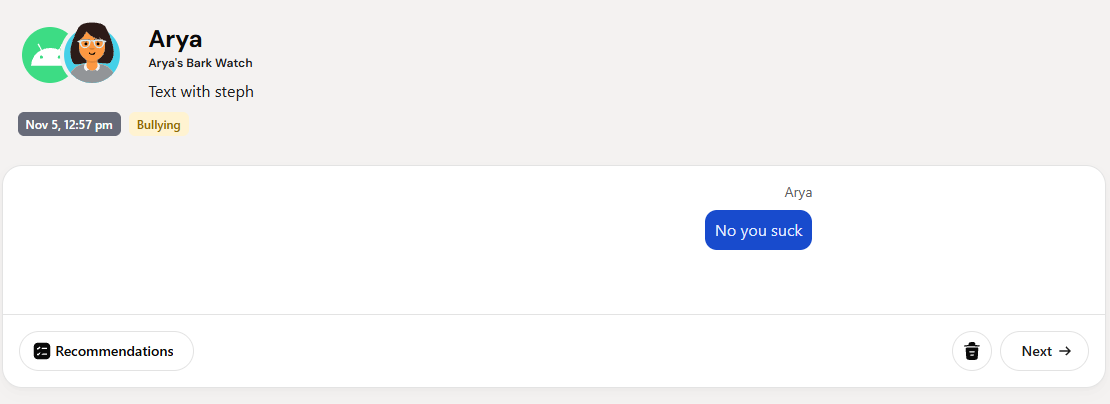
Another texting feature I checked was how well Bark Watch flags inappropriate texts. I sent a mildly mean text message, and it was flagged for bullying. The parent app showed me the specific text almost immediately but didn't reveal anything else from the conversation:
Bark Watch bullying text message alert in the parent app
For parents looking to protect their kids online, these alerts can help identify potentially concerning conversations without requiring them to read every message.
Bark Watch doesn't have the same wide range of monitoring capabilities as a smartphone, but that's because it intentionally lacks web browsing, social media, and other apps.
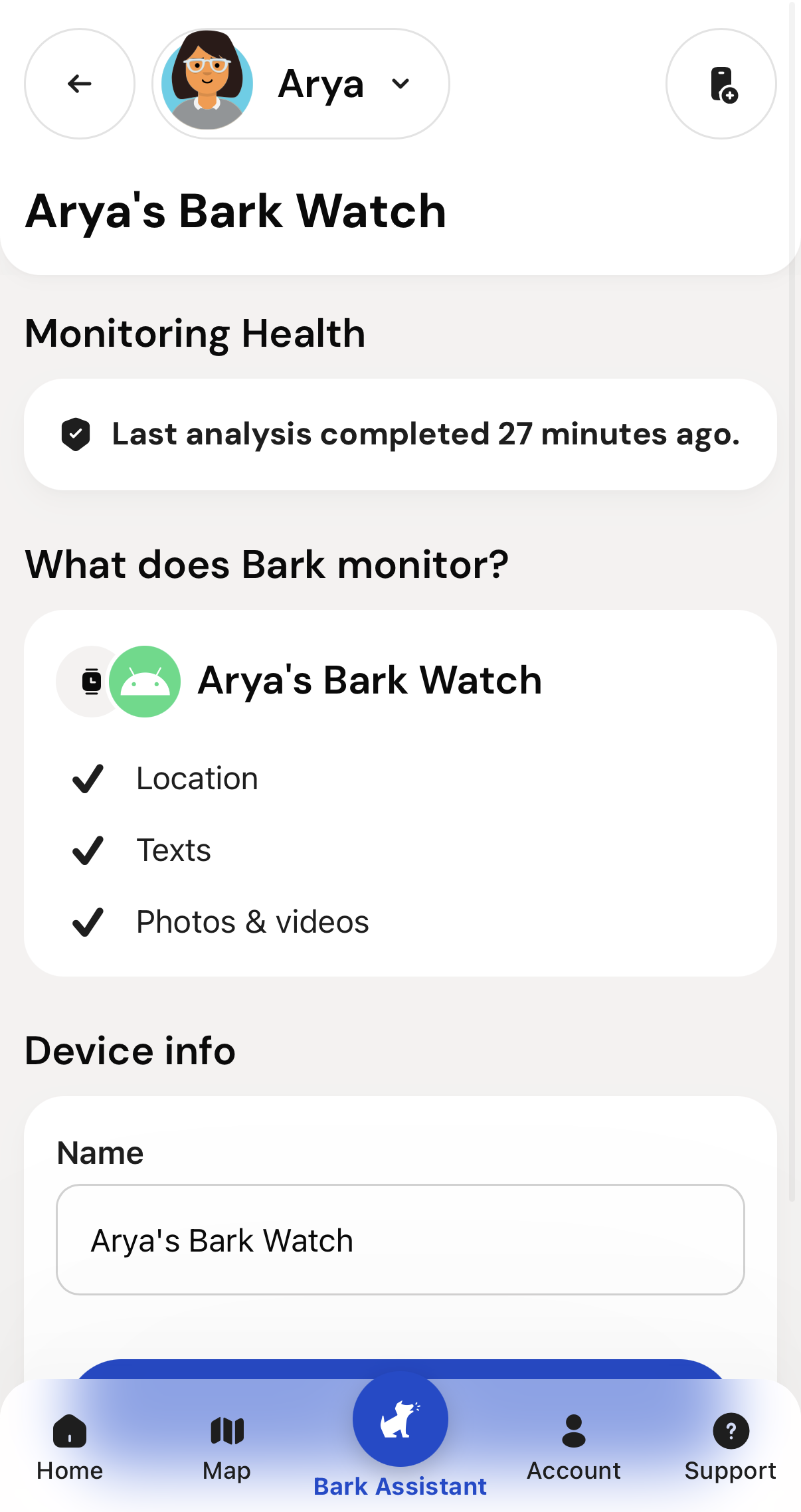
That said, the parent dashboard also lets you check the watch's monitoring status, see a timestamp of when Bark last analyzed its activity, and get an alert if anything appears broken. This unique feature helps you confirm that message monitoring is working as expected.
Bark Watch parental dashboard for All About Cookies testing
GPS location tracking
Testing Bark Watch's GPS location tracking was easy, and the results were accurate. I opened a page inside the parent app that showed a map with the watch's location, and it was nearly identical to my location on Google Maps. Any time I reopened that page, it refreshed.
The one thing I didn't like is that the Samsung model wouldn't let me create a list of favorite locations, which means there's no way to set up automatic alerts for when your child arrives at or leaves somewhere, such as home or school. Bark says this preserves battery life, but I think parents should be able to decide for themselves.
School schedules and restrictions
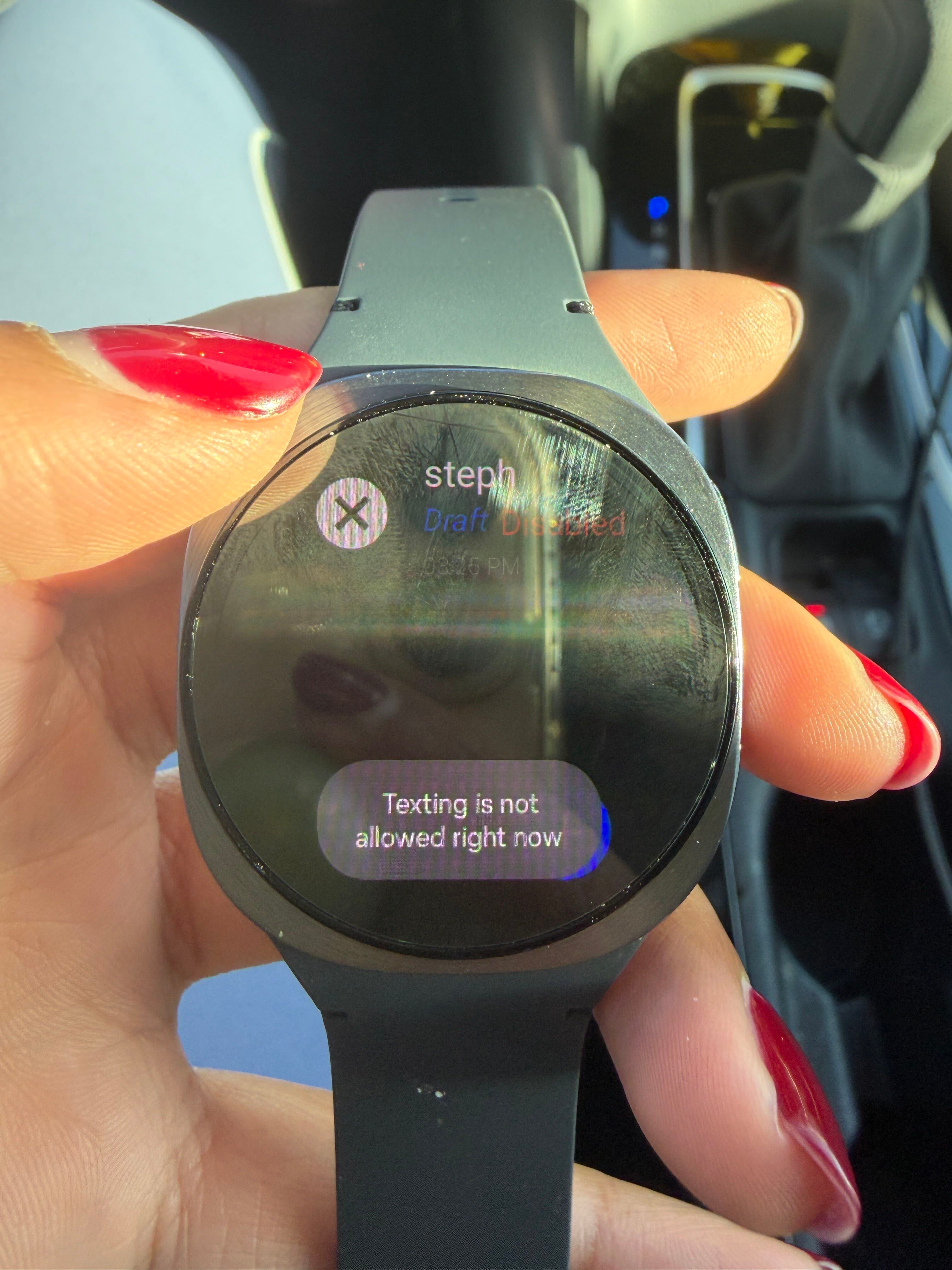
To check how Bark Watch would respond during a set school schedule, I went to the parent dashboard and configured School mode to allow calls only to emergency contacts. Then I tried to make a regular call by selecting the phone button, and nothing happened. I also tried texting by selecting the text button and received a message stating that texting wasn't available at that time.
You can use Bark Watch's screen time management features to manage your child's schedule in two ways. One is to set a daily time limit on overall usage, and the other is to create routines to help them stay focused on what they need to do at specified times.
Emergency calling and device shutdown
Bark Watch supports emergency calls to both designated emergency contacts and emergency services such as 911. Although I didn't place an emergency call during testing, Bark provides the following instructions:
To call an emergency contact: Press the top button to go to the watch face. From there, swipe up to open the Apps screen. Then tap Contacts, or tap Phone and then Contacts. Finally, tap an emergency contact, then tap Call or Message.
To call 911: There are two options. First, press the Home button five times to make the Emergency call icon appear. Then swipe right to make the call. The second way is to press and hold the Home button, tap Emergency call, then tap the emergency call icon again.
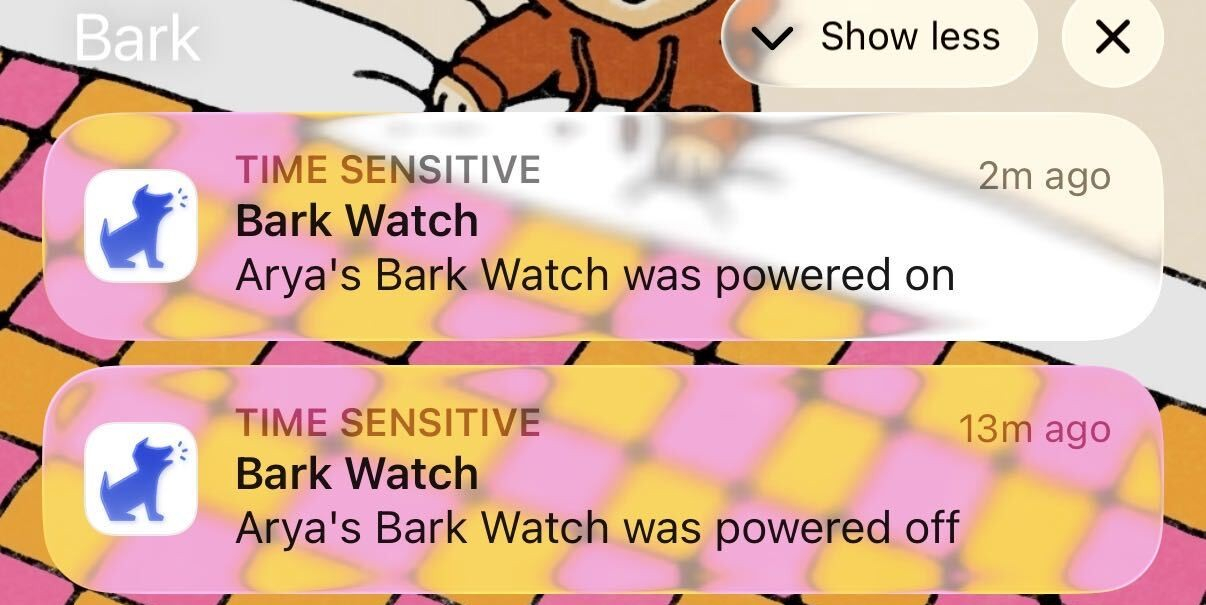
Bark Watch also sends notifications to the parent app whenever the device is turned on or off. I tried it myself and got notifications both times:
Bark Watch power-on and power-off notifications in the parent app
This is useful because if the device unexpectedly powers off, you can get an alert and follow up by reaching out to someone with your child.
Bark Watch hardware, battery life, and durability
Beyond its parental controls, a few things are worth knowing about Bark Watch's hardware, particularly its battery life, design, and water resistance.
Battery life and charging
The Samsung model I tested uses a non-removable 325 mAh battery that charges via a magnetic cable that attaches to the back of the watch. To charge it, you place the watch on a magnetic puck charger and plug the cable into a wall adapter or computer.
Bark doesn't publish an estimated battery life for Bark Watch, and I couldn't find a charging time listed in Bark's documentation. I didn't do extended battery-life testing, so I can't speak to how long the watch lasts under typical daily use.
To conserve the battery, you can lower screen brightness, shorten screen-on time, limit long calls, turn off Bluetooth or Wi-Fi when not needed, and keep the watch at moderate temperatures. Bark Watch will meet you partway with Power Saving mode, and if the battery drops to 1%, it'll switch to Watch Only mode to conserve power until you can charge it.
Design, comfort, and durability
Bark Watch weighs 30 g (1.06 oz). Numbers aside, I found Bark Watch light, and I appreciated the adjustable strap. The default strap color was black, but an extra $9 at checkout gets you a different color.
The screen was big enough to read messages. However, at 1.34 inches, I found it slightly awkward to type on with my adult fingers. I preferred using voice-to-text or the quick-reply presets.
Finally, though I didn't personally test its durability or water resistance, Bark Watch has 5 ATM and IP68 water-resistance ratings. These ratings are based on controlled tests in still freshwater: one lasting 10 minutes at a depth equivalent to 50 meters and the other lasting 30 minutes at 1.5 meters.
Note that real-life usage is often more demanding than testing conditions. Bark Watch is water-resistant, not waterproof, and shouldn't be used for diving, in saunas, or in other situations that could exceed its water-resistance limitations.
Bark Watch alternatives
In our 2026 Kids and Tech Study, we found that nearly half (49%) of parents whose children already had devices wished they'd waited longer before giving them one.
For families who want to introduce communication and location tracking before giving their children access to the web and social media, a kids' smartwatch offers an intermediate option. However, depending on which features you need, alternatives like Gizmo Watch and Gabb Watch might work better than Bark Watch.
For example, if you want your child to make video calls for up to three minutes, Gizmo Watch is the only one of the three with that feature. At $10/mo, its monthly wireless plan is also $5/mo cheaper than Bark's.
On the other hand, if your child struggles to complete tasks but enjoys playing games, Gabb Watch's built-in gamification could be the deciding factor. Its monthly plan is $13/mo with a two-year contract, plus a one-time $30 activation fee.
The three watches overlap a lot, so the final decision comes down to cost and the specific communication, monitoring, and location-tracking features your family needs.
Parents of older kids who are ready for more smartphone functionality might prefer Bark Phone. It offers many of the same monitoring and communication features, along with customizable access to apps, games, social media, and web browsing on its Advanced plans. Read my hands-on Bark Phone review to learn more.
PROMOTION: Get $30 Off the Bark Phone or Watch with Code JOY30 thru Dec. 24
Samsung Galaxy A16 or A37 with built-in parental controls for managing apps, contacts, screen time, and web access
Monitors texts and supported online activities for potential risks, including cyberbullying and predatory contact
Blocked apps stayed inaccessible in our testing, and restricted device settings required a parent code
If you're unsure which type of device makes sense for your family, our guide to choosing between a kids' phone, GPS watch, and parental monitoring app breaks down the benefits and limitations of each option.
Is Bark Watch worth it?
Bark Watch is worth considering for families with younger children who need a way to communicate and share their location without access to the web, social media, or games. During my testing, I found its GPS tracking to be accurate, message monitoring alerts arrived almost instantly, and contact restrictions worked as intended.
However, the lack of automatic arrival and departure alerts was a drawback, particularly for a device designed in part for location tracking. The monthly wireless subscription is also slightly more expensive than those of some competing watches, though the included Bark Premium subscription adds value for families who also want to monitor their children's other devices.
For older kids who are ready for more smartphone functionality, Bark Phone may be a better fit. If your child already owns a smartphone, you may find that one of the best parental control apps is a more economical option than purchasing a separate device.
FAQs
How much does Bark Watch cost per month?
Bark Watch costs $15/mo for wireless service, which includes a Bark Premium subscription for the entire family. This excludes the upfront cost of the watch itself, which is $288. You can choose Affirm or Klarna at checkout to break the device cost into installment payments, subject to approval.
How long does Bark Watch's battery last?
Bark Watch's battery life depends on how you use it, and Bark doesn't publish an estimated battery life. Although Bark says GPS watches generally last 24–48 hours under mixed use, this isn't a confirmed battery-life estimate for Bark Watch.[1][2] To help preserve the battery, the watch has a Power Saving mode and switches to Watch Only mode when the battery drops to 1%.
Is Bark Watch waterproof?
No, Bark Watch is water-resistant rather than waterproof. The Samsung Galaxy Watch8 model has 5 ATM and IP68 water-resistance ratings, based on controlled tests in still freshwater. One test lasted 10 minutes at a depth equivalent to 50 meters, and the other lasted 30 minutes at 1.5 meters. Actual use varies and can be more demanding than testing conditions.
Can Bark Watch track your child's location?
Yes. When I tested the Samsung Galaxy Watch8 model of Bark Watch, its reported location closely matched my location on Google Maps. However, this model doesn't support Favorite Location alerts, meaning you can't receive automatic notifications when your child arrives at or leaves designated locations. You can still check your child's location in the parent app.
Steph Trejos is a Certified Anti-Money Laundering Specialist (CAMS), a credential that reflects deep expertise in financial crime, fraud patterns, and cyber threats. As a Senior Product Testing Editor at All About Cookies, she has personally evaluated over 200 digital security products and brings that forensic rigor to every review she oversees. Before joining AAC, she produced publications on financial crime and cyber threats at ACAMS.